When a live chat pings, the clock is ticking. You’ve only got a few seconds to reply before the visitor gets bored and wanders off.
But for a lot of businesses, this is where things get messy. The chat tool is open in one tab, the CRM is in another, and customer tickets are hiding somewhere else entirely. By the time someone frantically digs up the right info, the visitor is long gone.
Even if you have a shiny live chat tool, conversations often just fizzle out. Leads drop off the radar, and nobody really knows what happened after the chat window closed.
Here is how Odoo Live Chat wires your website conversations directly into your business, making sure no visitor slips through the net.
Odoo Live Chat fills in the gaps for customer-facing teams
Odoo Live Chat is designed to actually do something with a visitor's question, rather than just leaving it hanging.
It does this by storing every single conversation permanently inside Odoo, right next to the rest of your customer data. This means the second a chat begins, your team already has the visitor's order history, previous support requests, and contact details right in front of them.
Odoo simply solves the most common problems for customer-facing teams:
Chats getting lost: Every chat is saved with a full history. You can easily email a copy to the visitor or keep it saved for your team to read later
Agents not knowing who they are talking to: If the visitor is an existing customer, their previous orders and support history appear automatically
Leads going cold: Your team can create a sales lead or a support ticket straight from the chat window. The visitor's details are filled in automatically, so there is no double data entry
Managers left in the dark: When things get busy, a single, clear dashboard shows every active chat, who is handling it, and exactly how long the visitor has been waiting.
How to use Odoo Live Chat in your day-to-day
Here is a quick look at how Odoo Live Chat runs in practice:
Control exactly when and where the chat appears
You get to decide how the chat window behaves on every single page of your site. Common setups include:
Specific buttons: Only show the chat button on key pages, like your contact or pricing pages.
Auto-open chats: Have the chat open automatically after a few seconds on pages where visitors are likely to buy (like a booking form or specific product page).
Hiding the chat: Hide the button completely on pages where live chat isn't really needed, such as your blog or careers page.
Regional settings: Change how the chat works by country if you have regional teams looking after different markets.
Rules work in order of priority, so you can be as broad or as specific as you like.
Let a chatbot handle the first steps
Not every chat needs a human straight away. Odoo's built-in chatbot handles the start of a conversation automatically.
It says hello, finds out what the visitor needs, and collects their contact details before handing them over to a real person. You can also set the bot to step in only when your team is busy or offline, so visitors always get a human first if someone is free.
In v19, Odoo introduced a dedicated AI Agent to help you automate your Live Chat.
Odoo AI steps in when a live agent can’t - it uses context from your website and internal knowledge to provide your lead with relevant information.
The AI live agent can also get contact information, share alternative contact points, or connect the customer with a real human team member.
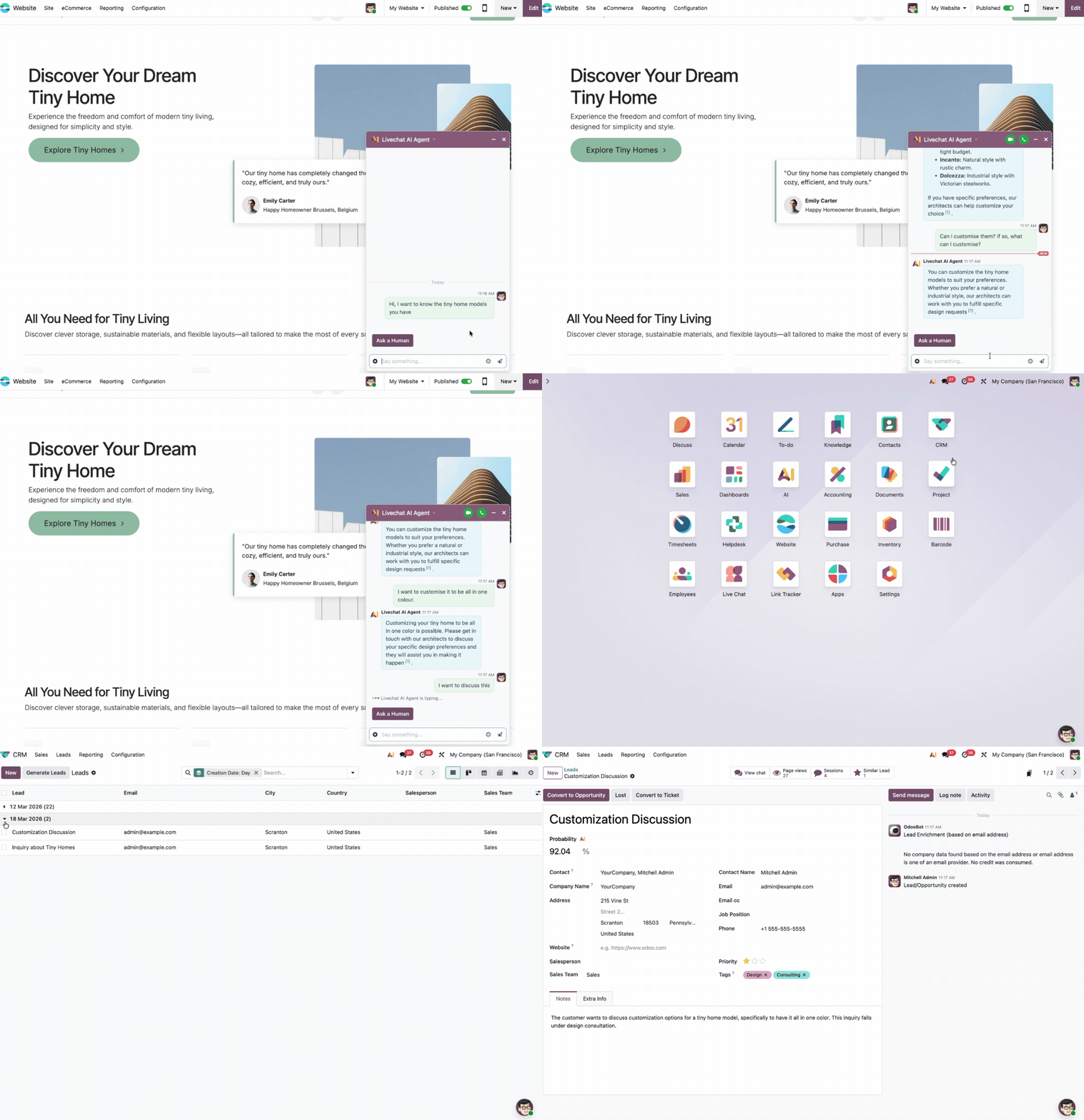
Forward conversations to the right person automatically
When someone starts chatting, Odoo doesn't just drop the message into a shared queue. It actively finds the best person for the job by looking at:
Language: Visitors are matched to agents who speak their language
Location: If you cover multiple countries, visitors are pointed to the right local team
Workload: Agents who are already handling several chats are pushed down the list
Availability: Agents who have stepped away from their desk for a moment are skipped entirely.
Your team can also set a friendly display name for Live Chat, so customers see a first name rather than an internal account name.
Take action without switching apps
Once a chat is open, your team can get real work done without ever leaving the window. Depending on which other Odoo apps you use, agents can:
Create a sales lead with the visitor's details already filled out
Open a support ticket and attach it directly to the conversation
Look at a returning customer’s full order and support history
Send a message to someone actively browsing the site before they even ask a question.
Keep an eye on how the team is doing
Odoo Live Chat records every session and puts the data into a clear reporting dashboard. Managers can easily see:
How long conversations usually last
How quickly agents are replying
How many chats went completely unanswered
How happy visitors were after the chat ended
Individual agent stats (response times, total chats handled, satisfaction scores).
Gathering feedback is completely painless. After a chat finishes, the visitor gets a quick prompt to rate their experience. These scores are tracked over time and linked straight back to the agent who handled it.
You can even choose to get a regular email summary of your main numbers, like chat volume, customer happiness, and average response times.
Real-world use cases for your teams
Sales
Sales reps can use Live Chat to catch people at the exact right moment, rather than waiting around for someone to fill out a form:
A visitor lands on your pricing page
Live Chat automatically opens after five seconds
The chatbot asks what they need and collects their email
The chat is handed over to a sales rep with all the background information ready to go
The rep turns the chat into a proper lead with just one click.
Customer support
Support teams use Live Chat to solve issues much faster, because everything they need is in one place:
A customer opens a chat about a missing delivery
The agent instantly sees their order history and past tickets
The agent fixes the problem or passes it up to a senior colleague
A support ticket is created automatically, with the whole chat history attached
The customer leaves a quick rating when the chat closes.
Marketing
Marketing teams can control exactly when the chat window appears, grabbing attention at the perfect moment without bothering people elsewhere on the site:
The team sets rules for which pages trigger the chat
Pages with high buying interest get an auto-popup; casual browsing pages hide the button entirely
The chatbot catches out-of-hours visitors to make sure no contact details are missed
Leads drop straight into the customer database, with zero manual typing required.
Account management
For teams looking after long-term clients, Live Chat sits perfectly alongside order histories and past chats in the same system:
An existing client visits the website
Their account manager spots the visit and sends them a quick message
The whole order and conversation history is visible right there in the chat window
Any follow-ups (tickets, new leads, internal notes) are saved securely on the client’s file.
Odoo Live Chat FAQs
Does Odoo Live Chat integrate directly with Odoo CRM and Helpdesk?
Yes. Agents can turn live chat conversations into CRM leads or Helpdesk support tickets with simple inline commands like /lead or /ticket, without leaving the chat interface. The full conversation transcript automatically attaches to the created record.
How does Odoo Live Chat manage incoming chat requests?
The system uses automated channel rules to assign chats based on operator availability, country, language, and workload. You can also configure chatbots or AI Agents to greet visitors, answer routine questions, and qualify leads before transferring the conversation to a human agent.
Does Odoo Live Chat work on non-Odoo websites?
Yes. While it integrates natively with the Odoo Website app, Odoo provides an embeddable JavaScript snippet that lets you run Odoo Live Chat on external platforms like WordPress, Shopify, or custom websites.
Let's sort out your Odoo Live Chat setup
Our Odoo experts can help you get everything connected, making sure you never lose track of a lead or a conversation again.