If you know Odoo, chances are you’ve probably heard the never-ending discussion about Odoo Studio.
For businesses wanting to avoid the cost of custom development, a drag-and-drop no-code tool for ERP customisation is a huge win.
But as with any easy fix, there is always a catch.
We’ve broken down exactly where Odoo Studio adds value, where it starts to fail, and our tips to use it.
Tips on Odoo Studio for non-technical users
At its core, Odoo Studio is a layer that sits on top of the standard Odoo modules. It provides a visual interface to modify the database and the user interface without directly writing code.
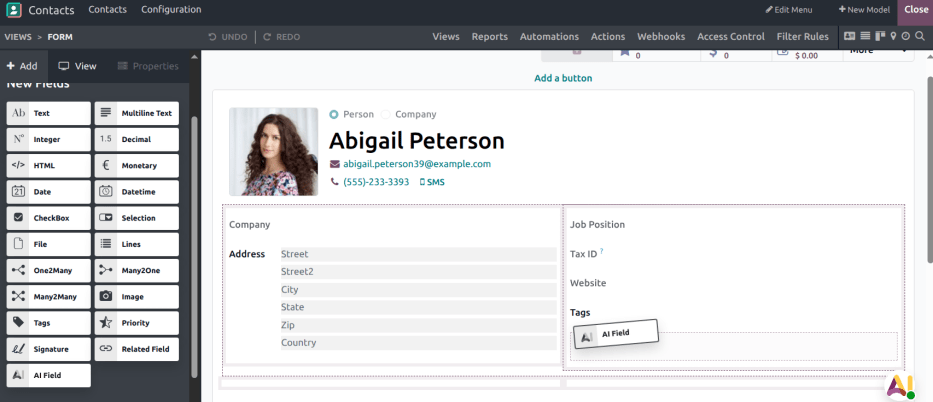
Though it looks like you are building on your apps, you are actually creating a series of overrides that tell Odoo to behave differently than the source code intended.
After testing Studio from a non-technical perspective, here are our takeaways on what to watch out for:
- Knowledge is mandatory: No-code doesn't mean no-knowledge. If you don't understand how relational fields (Many2one, etc.) behave, you will create broken dependencies
- Test it until it works: Automated actions and visibility rules can be inconsistent. Logic that seems fine on the surface often fails to trigger correctly, depending on the user context. You will have to adjust the same workflow or test it multiple times until it works the way you want
- Odoo Studio is a band-aid, not a long-term strategy: It’s fine for impromptu changes, but it is not a foundation to build a growing business on. At a certain point, rules will override each other, and dependencies will interlink until you can’t fix it yourself anymore.
Odoo Studio works for simple tasks
Now, before we get called haters, let us be clear: Odoo Studio isn’t a bad app per se. However, it is advertised and used for the wrong type of work.
Odoo Studio can be a great tool for:
- Low-impact adjustments: You can add a one-off field to capture a data point or adjust a view for usability
- Quick fixes & experiments: Teams can test and validate logic concepts or UI views quickly without heavy coding investment
- Creating AI fields for unstructured data: Odoo Studio lets you build fields with AI prompts that handle unstructured data and adapt to new rules in seconds.
Yet, it creates long-term technical debt
Working with Odoo Studio seems easy at first.
You’re adding business-specific fields, your system is looking exactly as you want, and you didn’t even need a developer to do it.
While these adjustments are useful at first, they gradually accumulate into redundant code and complex overrides that are difficult to manage.
Here’s how Odoo Studio can become a blocker in the long run:
- It breaks your upgrades: Studio uses XPath expressions to link your changes to specific lines of source code. When Odoo updates and migrates those extra code lines, your customisations break. This turns a routine upgrade into a high-stakes recovery project
- It builds hidden maintenance costs: Because Odoo Studio logic is buried in the database (like ir.ui.view) rather than version-controlled code, it’s nearly impossible to audit. When something breaks six months later, finding the cause is a nightmare. And at the end of the day, you’ll still pay for development work to fix it
- It makes your system perform worse: Every drag-and-drop change adds lines of code. As your data volume grows, these overrides can lead to duplicate data and slow query speeds, eventually forcing you to pay a developer to rebuild everything from scratch anyway.
Odoo Studio FAQs
What is Odoo Studio?
Odoo Studio is a low-code tool that allows you to customise your ERP without writing code. It provides a visual, drag-and-drop interface for adding new fields, changing form views, and creating automated actions. It works as a layer of overrides that sits on top of your standard Odoo apps to make them fit your specific business flow.
Is Odoo Studio really no-code?
Yes. But while you don't need to write code, you do need a technical mindset. To use Studio safely, you must understand Odoo’s data model and how to connect different parts of your business. Without this knowledge, it’s easy to create broken dependencies that are difficult for non-developers to untangle later.
Does Studio customisation affect my Odoo upgrades?
Studio customisations can make upgrades more complex. Because Studio uses XPath to link your changes to specific lines of Odoo's source code, those links can break when Odoo releases a new version with updated code. This often requires manual re-linking or fixing broken views during the upgrade process, which can increase your maintenance costs.
Let’s customise your Odoo to scale
We help you build your Odoo architecture properly. Reach out to our experts to discuss scalable, high-performance customisations tailored to your business.