In the manufacturing industry, you can’t treat quality control as an afterthought.
When production needs to meet strict regulatory requirements to stay legal, it has to be handled as a priority.
In Odoo, quality control is a non-negotiable part of production. A work order can’t be closed if there's an open check.
See how Odoo Quality proactively spots errors and keeps track of every move so your operations are fully compliant.
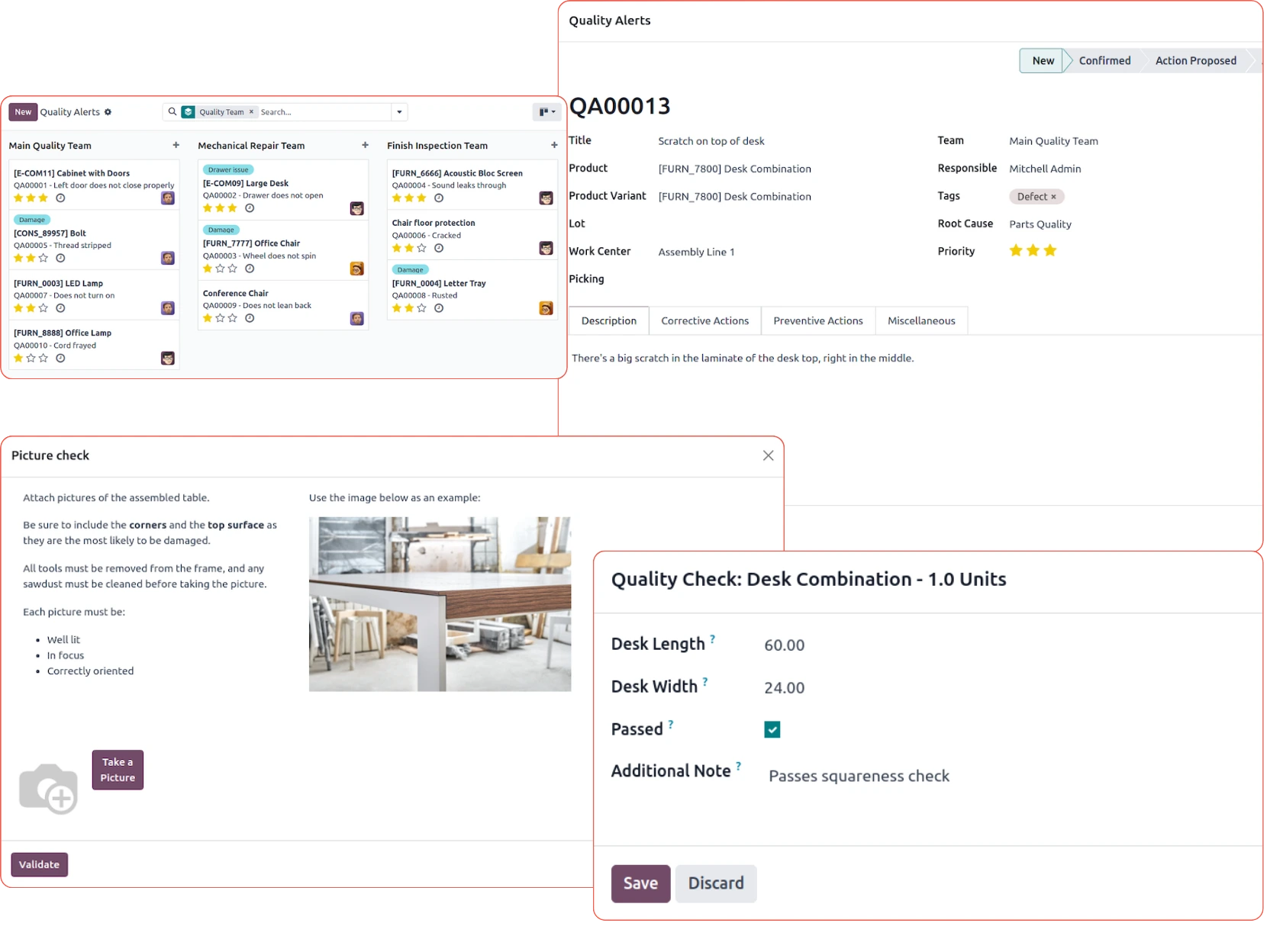
Odoo quality at a glance
Odoo enables end-to-end quality control along the production line
In many manufacturing businesses, quality control is fragmented.
When something goes wrong, proving it to an auditor means chasing records across multiple systems.
In Odoo, the manufacturing order, quality check, logged result, and alert all live in one place. Here's what that looks like:
1 - The operator on the shop floor
When an operator opens a manufacturing order or scans a work step, they see a checklist built into their screen.
It asks them to measure a dimension, confirm a visual inspection, or take a photo. They fill it in, mark pass or fail, and move on. They never leave the production view to do it.
If something fails, they note it down, and the system flags the order.
The goods don't go to the next step until someone with authority decides what happens.
2 - The warehouse worker
When goods arrive from a supplier, a receipt automatically generates inspection tasks. The worker checks the right quantity, condition, or measurements before the goods are put away.
If the checks are not completed, they can't confirm the receipt.
3 - The quality manager
Quality managers don't set up checks manually for every order, but they define the rules to deploy them.
If they set up rules that say "for this type of product, at this step, check these things”, Odoo generates quality checks automatically based on those requirements.
When something goes wrong, the manager opens the alert, documents the root cause, assigns corrective and preventive actions, and tracks them to closure.
Managing non-conformances with Odoo Quality
Failed checks are part of the process, which is why quality management systems exist.
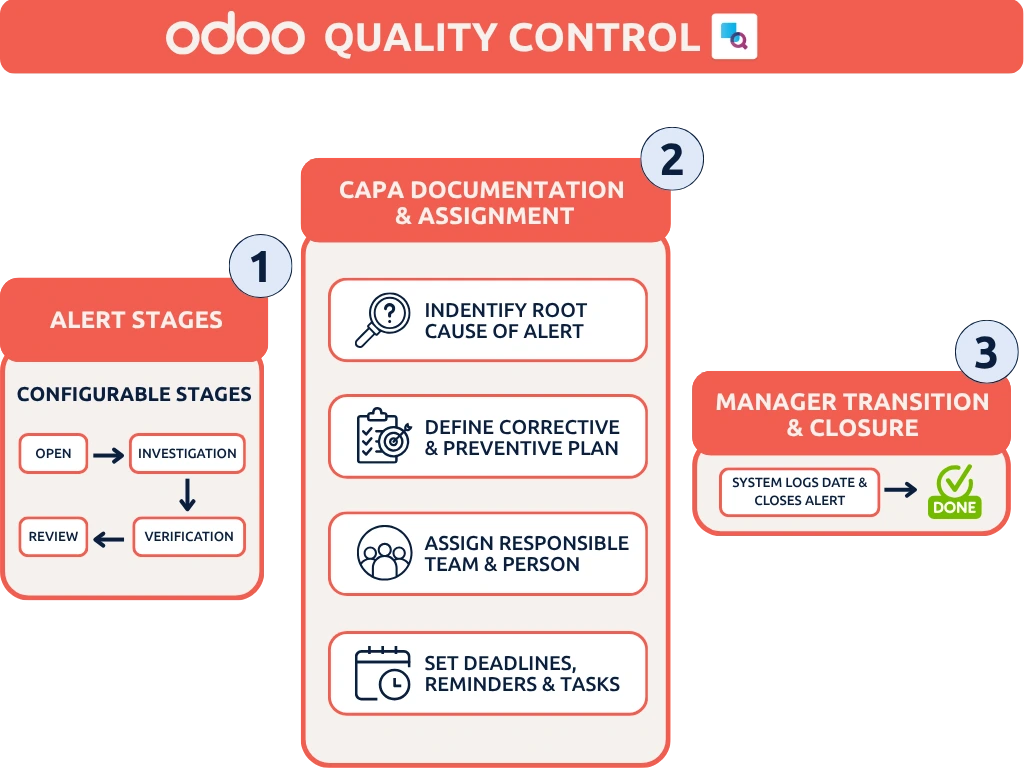
Odoo Quality handles this through its alerts feature, which works as a corrective and preventive action (CAPA) workflow.
When a check fails, an alert is raised. From there, the quality manager can document:
Category of root cause: what type of problem caused the failure
Corrective action: what was done to fix this specific occurrence
Preventive action: what will be done to stop it from happening again
Responsible team and person: who is accountable for follow-through
Prioritisation: normal, low, high, or very high.
Alerts move through configurable stages, from open investigation to closure. A record is closed only when a manager moves it to the done stage, and the system automatically logs the date. Deadlines, reminders, and task assignments keep CAPA items from being lost.
Alerts can also be raised independently of a specific check: for example, based on a customer complaint or a supplier issue identified outside the normal inspection flow.
Configuring Odoo Quality for compliance
Any company that wants to stay compliant and keep audit trails with Odoo needs some baseline settings:
Feature | Configuration requirement | Purpose |
Electronic Signatures | Settings > General Settings > Digital Signatures | Enables secure signing for Quality Checks and Work Orders. |
2-Step/3-Step Routes | Inventory > Configuration > Warehouses | Creates the physical "Quality" stage in the warehouse flow. |
Worksheet Templates | Quality > Configuration > Worksheet Templates | Defines the specific data points required for a compliant inspection. |
Control Per... | Quality Control Point > Control Per (Product/Lot) | Crucial for MedTech; ensures each unique Serial Number is checked. |
Lock Quantities | Inventory > Configuration > Settings > Lock Quantities | Prevents the movement of products once they are assigned to a QC process. |
Applying Odoo Quality to specific regulations (e.g. ISO 9001, MDR/FDA)
Running a QMS in a regulated industry is a different challenge altogether.
Documentation requirements are stricter, and the margin for error in an audit trail is near zero.
Odoo’s standard features can carry a lot of that weight. The audit trail, lot and serial traceability, and CAPA workflows are the basis for any compliant QMS.
For companies operating under stringent regulations like ISO 9001, EU MDR, or FDA requirements, that means:
Controlled documentation with a clear approval trail
Quality checks that gate every step of production
Non-conformances tracked from root cause to closure
End-to-end traceability linking components, suppliers, and BOM versions to every finished product serial number
Employee qualification tracking to prove the right people did the right tasks.
At Odoo Experience, our manufacturing experts covered just that.
See how they built a compliant QMS in Odoo Standard, when it makes sense to customise, and how to do it right.
Odoo Quality FAQs
How does Odoo Quality enforce quality control during manufacturing?
Odoo Quality uses mandatory control points that act as quality gates across production steps and warehouse receipts. If a quality check fails or is not completed, the system prevents the operator from closing the work order or moving the inventory until the issue is resolved.
Can Odoo Quality handle CAPA and non-conformance management?
Yes. When a check fails, the system automatically triggers a Quality Alert to manage Corrective and Preventive Actions (CAPA). Quality managers can categorise root causes, assign responsible team members, track corrective actions through customisable stages, and maintain a complete audit log from investigation to closure.
Is Odoo Quality suitable for regulated industries like MedTech, ISO 9001, or FDA compliance?
Yes. By combining Odoo Quality with full lot/serial number traceability, electronic signatures, and locked warehouse routing, businesses can enforce strict compliance standards. It provides a solid audit trail that links specific product serial numbers, inspection worksheets, and BOM versions directly to the finished goods.
Let's discuss your Odoo quality setup
Our experts help you design quality workflows that fit your production process and hold up when auditors come knocking.