Companies still order from each other by email, PDF and phone. Often, someone still has to open every attachment and manually add it into the ERP. But EDI removes that step.
EDI, or Electronic Data Interchange, is the automated exchange of standard business documents (e.g., purchase orders and invoices) directly from one company's system to another.
With this technology, an order can be sent in a standardised format straight from one company's system into another's.
The Odoo EDI connector by much & Procuros automates order processing by connecting to your EDI partners, while AI manages the rest.
Companies face 3 main challenges when integrating EDI in their ERP
The hard part of an EDI project is rarely the ERP itself. Often, it’s connecting to companies on the other end.
Three problems come up in almost every project:
1. Slow onboarding: Every company uses a different format, so each connection has to be manually set up
2. Manual process by design: Smaller vendors who don’t use EDI keep sending orders by email, PDF or phone, so those orders still have to be manually input
3. Unstructured data: Order data is scattered across forms, PDFs and EDI messages, so none of it can be used as a reliable basis for reporting or automation.
As an open-source ERP, Odoo can easily connect to any technology you choose. With the right EDI integration, it can solve all three challenges.
The Odoo EDI connector by much. x Procuros links you to all your vendors & suppliers
Odoo can send and receive electronic invoices out of the box. It supports Factur-X, XRechnung (Germany) and other country-specific formats. It also acts as your Peppol access point for e-invoicing.
But customers and suppliers often use their own order formats, and Odoo can’t always read this data. This means that teams have to build order templates from scratch for every single partner.
Procuros is an EDI platform that connects to your business partners, using AI to extract and validate data from non-EDI documents such as PDF orders. It also flags and returns incorrect documents to the sender before these errors ever reach your system.
You maintain one connection from your Odoo to Procuros, and Procuros manages everything behind it.
The Odoo EDI connector by much. & Procuros solves them at once by removing the individual connection-per-partner setup.
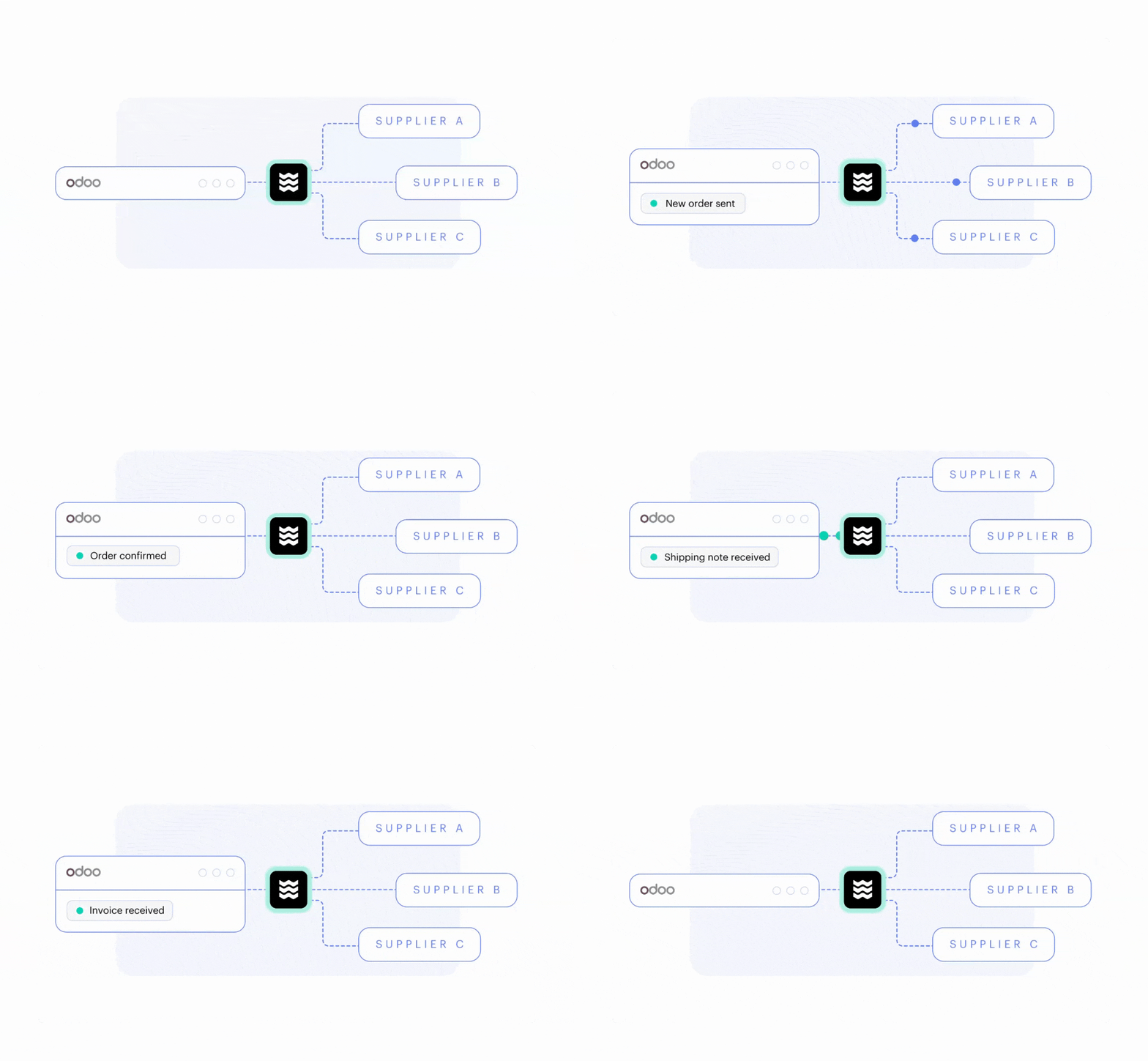
We co-developed the Odoo connector with Procuros, and it is available in the marketplace for any Odoo customer to use.
How it works:
Connect Odoo to Procuros via a central configuration screen
Choose the default salesperson, warehouse, location and shipping method for incoming orders
Once the connection is set up, you can automatically exchange sales orders, invoices, credit notes and stock pickings between Odoo and your partners through Procuros
Odoo checks for new orders every ten minutes, but you can change the setting to as low as every five minutes
Odoo logs every document sent and received, so you know exactly what went out or in, and if anything failed.
What it gives you:
Standard document coverage: The connector handles standard document types like sales orders, invoices, credit notes and stock pickings in both directions, without custom development
Multi-company support: One Odoo instance can run several company connections side by side
Full traceability: Every document sent and received is logged, and any error is immediately flagged, e.g., a product that does not exist in Odoo yet
Flexibility: Anything outside the standard document types, such as a connection to your logistics provider, can be built on top
Long-term support: Available for all users from Odoo 16, Odoo 17, Odoo 18, Odoo 19 and all future versions.
AI processes the orders from businesses that don’t use EDI
Your EDI project is now fully set up, but you still need to get data from partners who don't use EDI.
Normally, you’d extract order data from PDFs with templates. But for every new supplier or partner order form, you need to create individual layouts with specific rules.
AI removes that manual task. In Procuros, OCR AI (optical character recognition) reads PDFs and automatically extracts order data. Next, it matches product numbers and descriptions with Odoo records.
Your validation rules then run on the result, and anything that fails is sent back to the partner before it even reaches your system.
An internal team reviews the AI-extracted data against the original PDF and corrects any errors. Once the manual review is approved, it automatically imports orders into Odoo.
Odoo EDI success stories across industries
Businesses mostly rely on EDI when a small number of companies account for a large share of their order volume. These are some of the companies already running EDI in Odoo with much. & Procuros:
Sportswear commerce: A Swiss brand that sells high-performance sportswear to many partners. They use EDI extensively for B2B customer orders and supplier documents
Food delivery: A German company that sells frozen ready meals both directly to consumers and through large German supermarket chains. They use EDI to communicate between marketplaces and suppliers
B2B trading: A long-standing family business importing products from China for the European market, using EDI to communicate with overseas suppliers and exchange order/invoice with B2B customers
Promotional products and merchandise: A Cologne-based company imports and distributes other brands under licence. They use EDI to communicate between their suppliers and the brands they distribute for.
A typical company that can benefit from the Odoo EDI connector by much. & Procuros…
Works with more than 30+ customers or suppliers
Sells to large retailers that require EDI
Processes 1000+ orders a month
Receives orders in different formats.
What an Odoo EDI project looks like with the much. & Procuros connector
We include EDI as part of your Odoo implementation, and build your project with the Odoo EDI connector by much. x Procuros.
Customer involvement during the EDI setup process stays low. Expect to answer questions, chase a slow supplier, and occasionally perform a portal action that only you have access to.
1. Analysis and concept
First, we map the current state of the order process: what doesn’t work, what needs to be added, and what is worth carrying over.
Then, we decide together on the message types and the data to be transferred as part of the overall concept.
2. Scoping and partner outreach
Procuros scopes the document types and prioritises which partners to onboard first. We prepare your Odoo for the documents they will send, so both sides are ready at the same time. Outreach starts early because partner responsiveness is usually the blocker, not the connection itself.
3. Implementation
We configure, develop and migrate data into Odoo at the same time as we integrate the connector. Procuros runs testing, validation and partner mapping in parallel. End users test the setup before it’s approved to go live.
4. Go-live
The Odoo setup and the Procuros connector go live together, so EDI messages are sent and received from day one.
5. Long-term maintenance
We update the Procuros connector for every new Odoo version, so your EDI keeps working after every upgrade. If our customers need any additional features, we customise them.
If you need to add a new supplier or customer, we set it up in your Odoo while Procuros connects to them.
If you need to migrate from a legacy ERP or have order data in other software, we support the transition while Procuros stays connected to both systems. Orders keep coming in while you switch.
Procuros keeps the connections stable and adapts to any new requirements, including compliance changes that could result in penalties.
See the Odoo EDI connector in action
Our expert Nuhash Kinzel did a webinar with Procuros and walked through the whole Odoo EDI setup. Check out the live demo and see how a PDF order arrives via EDI as a confirmed sales order in Odoo.
Odoo EDI FAQs
Does Odoo have built-in EDI?
Partially. Odoo has built-in EDI for electronic invoicing only. It supports formats such as Factur-X and XRechnung, along with country-specific formats, and can act as your Peppol access point. It does not cover vendor and supplier document exchange, such as EDIFACT orders from a retailer or a connection over AS2 or OFTP, which is what the much. & Procuros Odoo EDI connector adds.
What documents can you exchange with the Odoo EDI connector?
The Odoo EDI connector by much. & Procuros exchanges sales orders, invoices, credit notes and stock pickings in both directions, with no custom development. Document types beyond that standard set can be built on top of the connector.
Can Odoo process orders from partners that don't use EDI?
Yes. With the much. & Procuros Odoo EDI connector, partners without EDI send their PDF orders to a dedicated email address. Then OCR AI extracts the order data and matches it to the products in your Odoo. Your validation rules run on the result, and the order is created as an Odoo sales order in the same structure as an EDI order.
Let’s automate your order process with Odoo EDI
Our experts help you with setting up EDI in your Odoo and automating your order process. We look at your business partners and document volumes, and tell you where the Procuros connector can take over.