Viele Unternehmen bestellen untereinander noch immer per E-Mail, PDF und Telefon. Oft muss noch jemand jeden Anhang öffnen und die Daten von Hand ins ERP übertragen. Mit EDI entfällt dieser Schritt.
EDI (Electronic Data Interchange, also elektronischer Datenaustausch) ist der automatisierte Austausch standardisierter Geschäftsdokumente (z. B. Bestellungen und Rechnungen) direkt vom System eines Unternehmens in das eines anderen.
Eine Bestellung gelangt so in einem einheitlichen Format ohne Umweg aus dem einen System ins andere.
Der Odoo EDI Connector von much. & Procuros automatisiert die Auftragsabwicklung, indem er sich mit Ihren EDI-Partnern verbindet – den Rest übernimmt KI.
Drei typische Herausforderungen bei der Integration von EDI in Ihr ERP
Die eigentliche Schwierigkeit in einem EDI-Projekt ist selten das ERP selbst, sondern meist die Anbindung der Unternehmen auf der anderen Seite.
Drei Probleme tauchen in fast jedem Projekt auf:
1. Langsames Onboarding: Jedes Unternehmen nutzt ein anderes Format, deshalb muss jede Verbindung von Hand eingerichtet werden
2. Handarbeit vorprogrammiert: Kleinere Lieferanten ohne EDI schicken Aufträge weiterhin per E-Mail, PDF oder Telefon, also müssen diese Aufträge nach wie vor manuell erfasst werden
3. Unstrukturierte Daten: Auftragsdaten sind über Formulare, PDFs und EDI-Nachrichten verstreut, sodass keine dieser Quellen eine verlässliche Grundlage für Reporting oder Automatisierung bietet.
Als Open-Source-ERP lässt sich Odoo problemlos mit nahezu jedem System verbinden. Mit der richtigen EDI-Integration löst es alle drei Herausforderungen.
Odoo EDI von much. & Procuros verbindet Sie mit allen Lieferanten & Zulieferern
Elektronische Rechnungen kann Odoo bereits im Standard senden und empfangen. Unterstützt werden Factur-X, XRechnung (Deutschland) und weitere länderspezifische Formate. Auch als Peppol-Zugangspunkt für die E-Rechnung lässt sich Odoo direkt nutzen.
Kunden und Lieferanten nutzen aber oft eigene Bestellformate, die Odoo nicht immer lesen kann. Die Folge: Teams müssen für jeden einzelnen Partner eigene Bestellvorlagen von Grund auf erstellen.
Procuros ist eine EDI-Plattform, die sich mit Ihren Geschäftspartnern verbindet und per KI Daten aus Nicht-EDI-Dokumenten wie PDF-Bestellungen ausliest und prüft. Fehlerhafte Dokumente markiert Procuros und schickt sie an den Absender zurück, bevor die Fehler überhaupt Ihr System erreichen.
Sie pflegen nur eine Verbindung von Odoo zu Procuros – um alles Weitere kümmert sich Procuros.
Der Odoo EDI Connector von much. & Procuros löst alle drei Herausforderungen auf einmal, denn die Einrichtung einer eigenen Verbindung pro Partner entfällt.
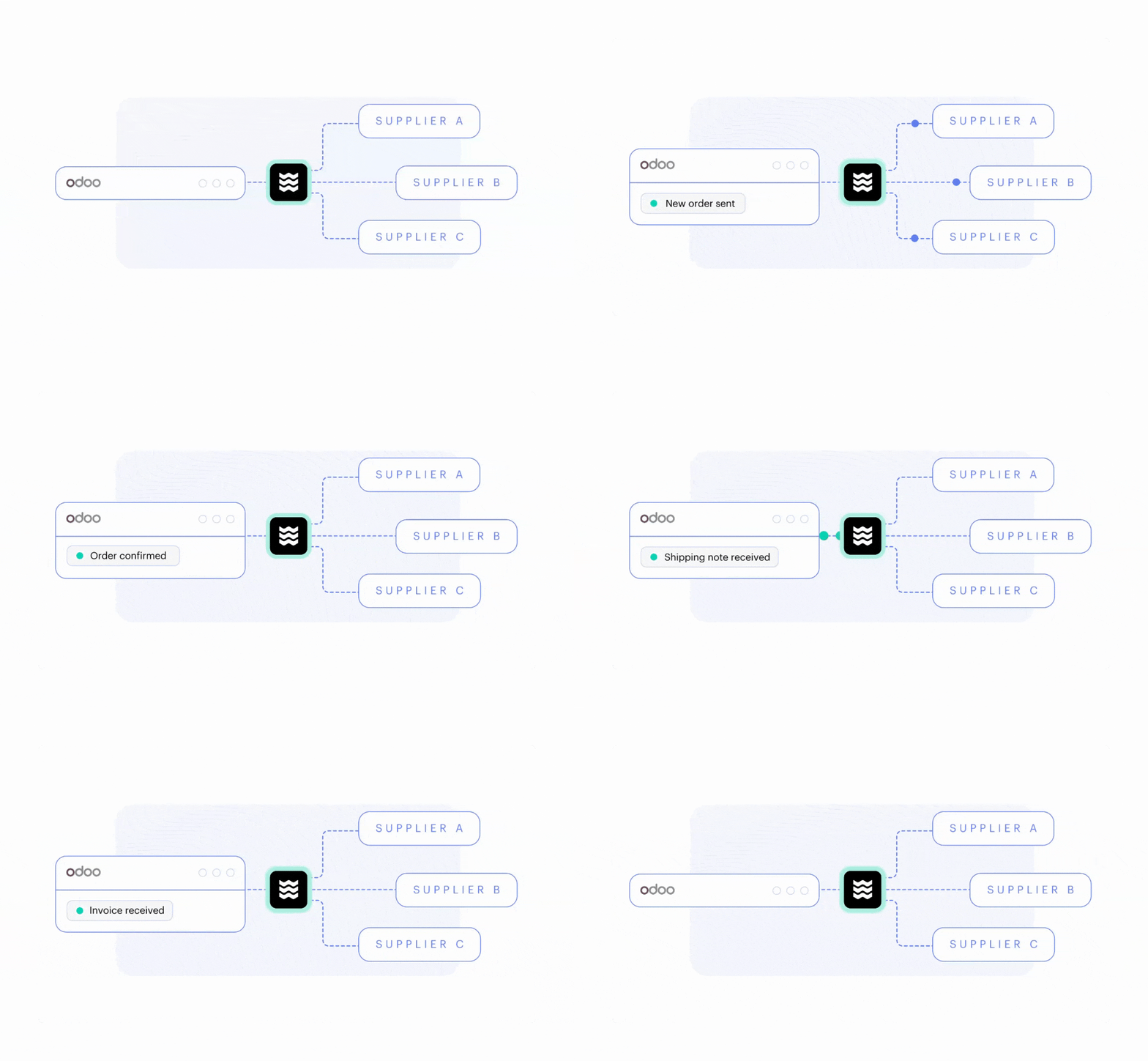
Wir haben den Odoo-Connector gemeinsam mit Procuros entwickelt. Er ist im Odoo App Store verfügbar und kann von jedem Odoo-Kunden genutzt werden.
So funktioniert es:
Sie verbinden Odoo über eine zentrale Konfigurationsseite mit Procuros
Sie legen Standardwerte für Verkäufer, Lager, Lagerort und Versandart eingehender Aufträge fest
Sobald die Verbindung steht, tauschen Sie Verkaufsaufträge, Rechnungen, Gutschriften und Lieferscheine automatisch über Procuros zwischen Odoo und Ihren Partnern aus
Odoo prüft alle zehn Minuten auf neue Aufträge – Sie können das Intervall aber bis auf alle fünf Minuten verkürzen
Odoo protokolliert jedes gesendete und empfangene Dokument. So sehen Sie genau, was aus- oder eingegangen ist und ob etwas fehlgeschlagen ist.
Ihre Vorteile:
Alle gängigen Dokumente: Der Connector verarbeitet Standarddokumenttypen wie Verkaufsaufträge, Rechnungen, Gutschriften und Lieferscheine in beide Richtungen – ganz ohne individuelle Entwicklung
Multi-Company-Support: Mit einer Odoo-Instanz können Sie mehrere Unternehmen parallel anbinden
Volle Nachverfolgbarkeit: Jedes gesendete und empfangene Dokument wird protokolliert, und Fehler werden sofort gemeldet, z. B. ein Produkt, das in Odoo noch nicht existiert
Flexibilität: Alles, was über die Standarddokumenttypen hinausgeht, etwa eine Anbindung an Ihren Logistikdienstleister, lässt sich ergänzend entwickeln
Langfristiger Support: Verfügbar für alle Nutzer von Odoo 16, Odoo 17, Odoo 18, Odoo 19 und allen künftigen Versionen.
KI verarbeitet die Bestellungen von Unternehmen ohne EDI
Ihr EDI-Projekt ist jetzt vollständig eingerichtet, aber Sie brauchen noch die Daten von Partnern, die kein EDI nutzen.
Normalerweise würden Sie Auftragsdaten mithilfe von Vorlagen aus PDFs auslesen. Für jedes neue Bestellformular eines Lieferanten oder Partners müssten Sie dann aber ein eigenes Layout mit spezifischen Regeln anlegen.
KI nimmt Ihnen diese Handarbeit ab. In Procuros liest OCR-KI (optische Zeichenerkennung) PDFs und extrahiert die Auftragsdaten automatisch. Anschließend gleicht sie Produktnummern und -beschreibungen mit den Datensätzen in Odoo ab.
Danach prüfen Ihre Validierungsregeln das Ergebnis, und alles, was durchfällt, geht an den Partner zurück, bevor es überhaupt Ihr System erreicht.
Ein internes Team prüft die von der KI extrahierten Daten anhand des Original-PDFs und korrigiert etwaige Fehler. Sobald die manuelle Prüfung abgeschlossen ist, werden die Aufträge automatisch in Odoo importiert.
Erfolgsgeschichten mit Odoo EDI aus verschiedenen Branchen
Auf EDI setzen Unternehmen vor allem dann, wenn wenige Geschäftspartner einen großen Teil des Auftragsvolumens ausmachen. Diese Unternehmen nutzen EDI in Odoo bereits mit much. & Procuros:
Handel mit Sportbekleidung: Eine Schweizer Marke, die Hochleistungs-Sportbekleidung an zahlreiche Partner verkauft und EDI intensiv für B2B-Kundenaufträge und Lieferantendokumente nutzt
Lieferung von Lebensmitteln: Ein deutsches Unternehmen, das tiefgekühlte Fertiggerichte direkt an Verbraucher und über große deutsche Supermarktketten verkauft. EDI dient hier der Kommunikation zwischen Marktplätzen und Lieferanten
Handel mit B2B-Kunden: Ein traditionsreiches Familienunternehmen, das Produkte aus China für den europäischen Markt importiert und über EDI mit Lieferanten in Übersee kommuniziert sowie Bestellungen und Rechnungen mit B2B-Kunden austauscht
Werbeartikel und Merchandise: Ein Kölner Unternehmen importiert und vertreibt Produkte anderer Marken in Lizenz. Über EDI kommuniziert es mit seinen Lieferanten und den Marken, für die es den Vertrieb übernimmt.
Vom Odoo EDI Connector von much. & Procuros profitiert typischerweise ein Unternehmen, das …
mit mehr als 30 Kunden oder Lieferanten zusammenarbeitet
an große Handelsketten verkauft, die EDI voraussetzen
mehr als 1.000 Aufträge im Monat abwickelt
Aufträge in unterschiedlichen Formaten erhält.
So läuft die Einführung von Odoo EDI mit dem Connector von much. & Procuros ab
Wir integrieren EDI direkt in Ihre Odoo-Implementierung und setzen Ihr Projekt mit dem Odoo EDI Connector von much. & Procuros um.
Ihr eigener Aufwand bei der Einrichtung von EDI bleibt gering. Rechnen Sie damit, Fragen zu beantworten, bei einem langsamen Lieferanten nachzuhaken und gelegentlich selbst in einem Portal tätig zu werden, auf das nur Sie Zugriff haben.
1. Analyse und Konzept
Zuerst erfassen wir den Ist-Zustand Ihres Bestellprozesses: was nicht funktioniert, was ergänzt werden muss und was wir übernehmen sollten.
Dann legen wir im Rahmen des Gesamtkonzepts gemeinsam fest, welche Nachrichtentypen und Daten übertragen werden.
2. Projektumfang und Ansprache der Partner
Procuros legt die Dokumenttypen fest und priorisiert, welche Partner zuerst angebunden werden. Wir bereiten Ihr Odoo auf die Dokumente vor, die diese Partner senden werden, sodass beide Seiten gleichzeitig startklar sind. Die Ansprache beginnt früh, denn meist bremst die Reaktionszeit der Partner, nicht die Verbindung selbst.
3. Implementierung
Gleichzeitig mit der Integration des Connectors konfigurieren und entwickeln wir Odoo und migrieren Ihre Daten. Procuros übernimmt parallel Tests, Validierung und Partner-Mapping. Die Endnutzer testen das Setup, bevor es für den Go-Live freigegeben wird.
4. Go-Live
Zum Go-Live starten das Odoo-Setup und der Procuros-Connector gemeinsam, sodass EDI-Nachrichten vom ersten Tag an gesendet und empfangen werden.
5. Langfristige Wartung
Wir passen den Procuros-Connector an jede neue Odoo-Version an, damit Ihr EDI auch nach jedem Upgrade zuverlässig läuft. Brauchen Sie zusätzliche Funktionen, entwickeln wir sie individuell für Sie.
Möchten Sie einen neuen Lieferanten oder Kunden hinzufügen, richten wir ihn in Ihrem Odoo ein, während Procuros die Verbindung herstellt.
Wechseln Sie von einem älteren ERP oder liegen Ihre Auftragsdaten noch in einer anderen Software, begleiten wir den Umstieg, während Procuros mit beiden Systemen verbunden bleibt. So kommen Ihre Aufträge auch während des Wechsels weiter an.
Procuros hält die Verbindungen stabil und passt sie an neue Anforderungen an, auch an geänderte Compliance-Vorgaben, bei denen Strafen drohen.
Der Odoo EDI Connector in Aktion
Unser Experte Nuhash Kinzel hat gemeinsam mit Procuros ein Webinar gehalten und dabei die komplette Einrichtung von Odoo EDI gezeigt. Sehen Sie sich die Live-Demo an und erleben Sie, wie eine PDF-Bestellung per EDI als bestätigter Verkaufsauftrag in Odoo ankommt.
Häufige Fragen zu Odoo EDI
Ist EDI in Odoo im Standard enthalten?
Teilweise. Odoo bietet integriertes EDI nur für die elektronische Rechnungsstellung. Es unterstützt Formate wie Factur-X und XRechnung sowie weitere länderspezifische Formate und kann als Ihr Peppol-Zugangspunkt dienen. Den Dokumentenaustausch mit Lieferanten und Zulieferern, etwa EDIFACT-Bestellungen eines Händlers oder eine Anbindung über AS2 oder OFTP, deckt es nicht ab – genau das ergänzt der Odoo EDI Connector von much. & Procuros.
Welche Dokumente tauscht der Connector für Odoo EDI aus?
Der Odoo EDI Connector von much. & Procuros tauscht Verkaufsaufträge, Rechnungen, Gutschriften und Lieferscheine in beide Richtungen aus, ganz ohne individuelle Entwicklung. Weitere Dokumenttypen lassen sich ergänzend auf Basis des Connectors entwickeln.
Kann Odoo Aufträge von Partnern ohne EDI verarbeiten?
Ja. Mit dem Odoo EDI Connector von much. & Procuros senden Partner ohne EDI ihre PDF-Bestellungen an eine eigene E-Mail-Adresse. OCR-KI extrahiert dann die Auftragsdaten und ordnet sie den Produkten in Ihrem Odoo zu. Ihre Validierungsregeln prüfen das Ergebnis, und der Auftrag wird als Verkaufsauftrag in Odoo angelegt, in derselben Struktur wie ein EDI-Auftrag.
Automatisieren Sie Ihren Bestellprozess mit Odoo EDI
Unsere Experten unterstützen Sie bei der Einrichtung von EDI in Odoo und der Automatisierung Ihres Bestellprozesses. Wir sehen uns Ihre Geschäftspartner und Ihr Dokumentenvolumen an und zeigen Ihnen, wo der Procuros-Connector die Arbeit übernehmen kann.