Field Service was an Odoo app dedicated to planning, delivering, and tracking on-site services.
As of version 19.2, it was integrated with Odoo Planning to combine scheduling and field operations into one seamless interface.
Learn how field service management now works in Odoo, and how it ties in with the rest of your ecosystem.
Odoo Field Service is now integrated with Odoo Planning
The Odoo 19.2 release notes announced that Odoo Field Service has officially been discontinued. Instead, all of its core features have been merged into the Odoo Planning app.

Users will still find the same tools for on-site work that existed in Field Service, now with new scheduling capabilities.
If you are used to the old Field Service app, here is how the update will change how you work:
Feature | Previously in Odoo Field Service | Now in Odoo Planning |
Worksheets | Require Odoo Studio to customise fields. | Uses standard property fields (no Studio required). Technicians can take photos and attach them directly to the final PDF report. |
Time tracking & execution | Standard timesheet logging. | New "Sign In" and "Complete" buttons capture geolocation, open a portal for client signatures, and log dedicated break times. |
Resource allocation | Jobs were generally assigned to a single technician. | Can assign multiple technicians and specific materials to a single shift. Time is automatically multiplied by the team size. |
Billing & warranties | Standard invoicing based on timesheets and materials. | Shift times are automatically linked to Sales Orders, and go straight to invoicing. If a repair is covered, clickling a new "under warranty" toggle updates your stock levels without charging your customer for that part. |
Task linking & contracts | Jobs linked to overarching projects. | Shifts can be tied to specific project tasks and set up as recurring shifts to easily manage long-term Subscription contracts. |
Navigation | Basic address fields. | Built-in location button computes map directions directly to the client's site. |
Odoo supports on-site teams across all industries
Field service management in Odoo is meant for businesses that provide on-site services for their customers. It supports teams in:
- Equipment installation and setup
- Technical maintenance and repairs
- Safety inspections and compliance checks
- Site-based troubleshooting and diagnostics.
It works across a range of industries, like:
- HVAC (heating, ventilation, and air conditioning),
- facilities management (such as building services and maintenance),
- telecom,
- and manufacturing.
It adapts to both reactive and scheduled service models.
Each service task contains location, customer details, required parts, and instructions.
Field staff can work from mobile devices and update everything on the go, even without an internet connection.
Odoo Field Service supports on-site teams across all industries
Odoo Field Service is designed for businesses that provide services away from the office. It supports teams in:
- Equipment installation and setup.
- Technical maintenance and repairs.
- Safety inspections and compliance checks.
- Site-based troubleshooting and diagnostics.
Odoo Field Service works across a range of industries like HVAC (heating, ventilation and air conditioning), facilities management (such as building services and maintenance), telecom, and manufacturing. It adapts to both reactive and scheduled service models.
Each service task contains location, customer details, required parts, and instructions.
Field staff can work from mobile devices and update everything on the go, even without an internet connection.
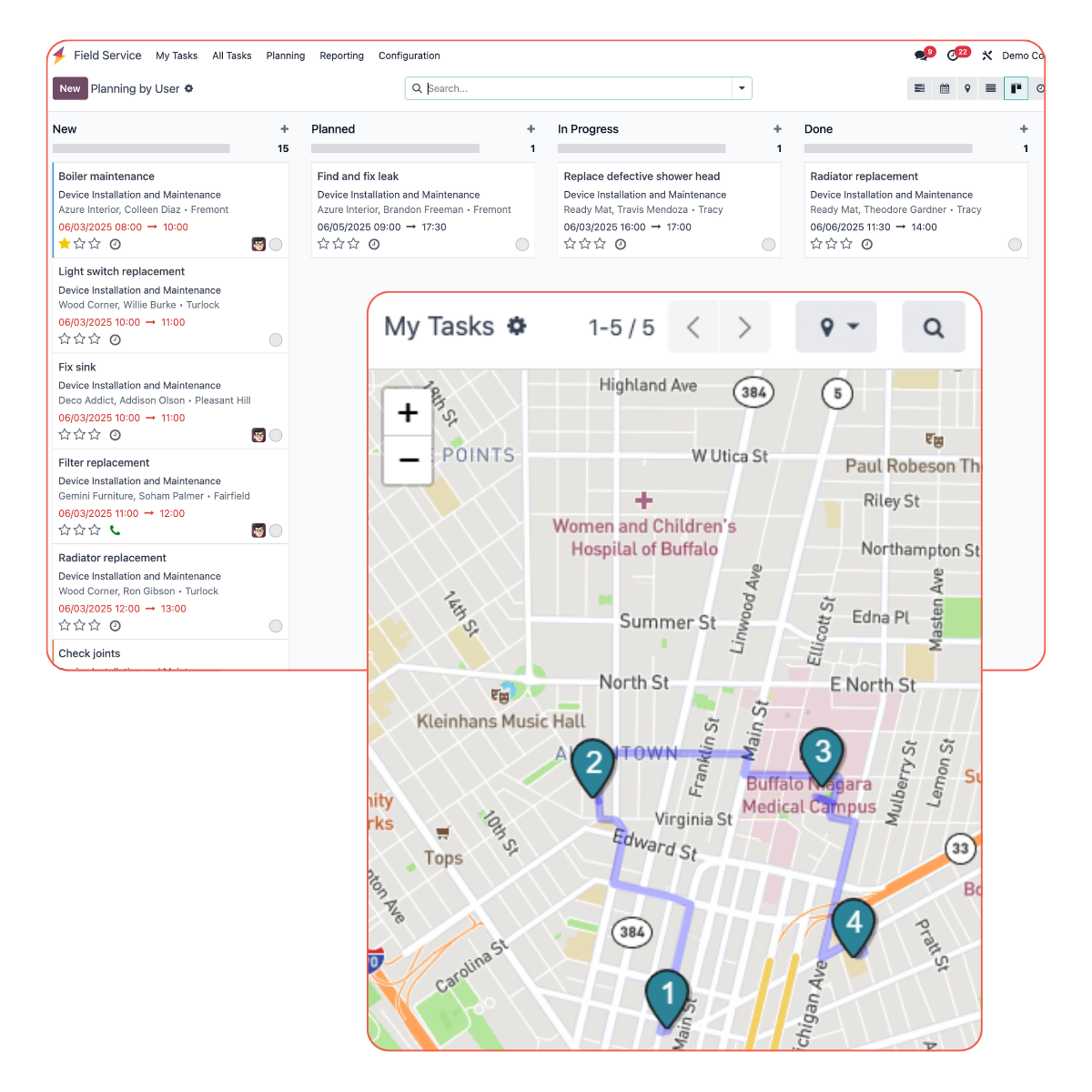
Odoo Field Service tasks can be sorted by user, project, map views, and more
Odoo makes field service work easier with mobile app features
The app is built for mobility and real-time coordination. It includes:
- Mobile access for technicians with offline mode.
- Time tracking with optional timesheet entry.
- Customer signature capture for service confirmation.
- Material logging linked to product stock.
Odoo makes field service work easier with mobile app features
The app is built for mobility and real-time coordination. It includes:
- Mobile access for technicians in offline mode
- Time tracking with optional timesheet entry
- Customer signature capture for service confirmation
- Material logging that links to product stock.
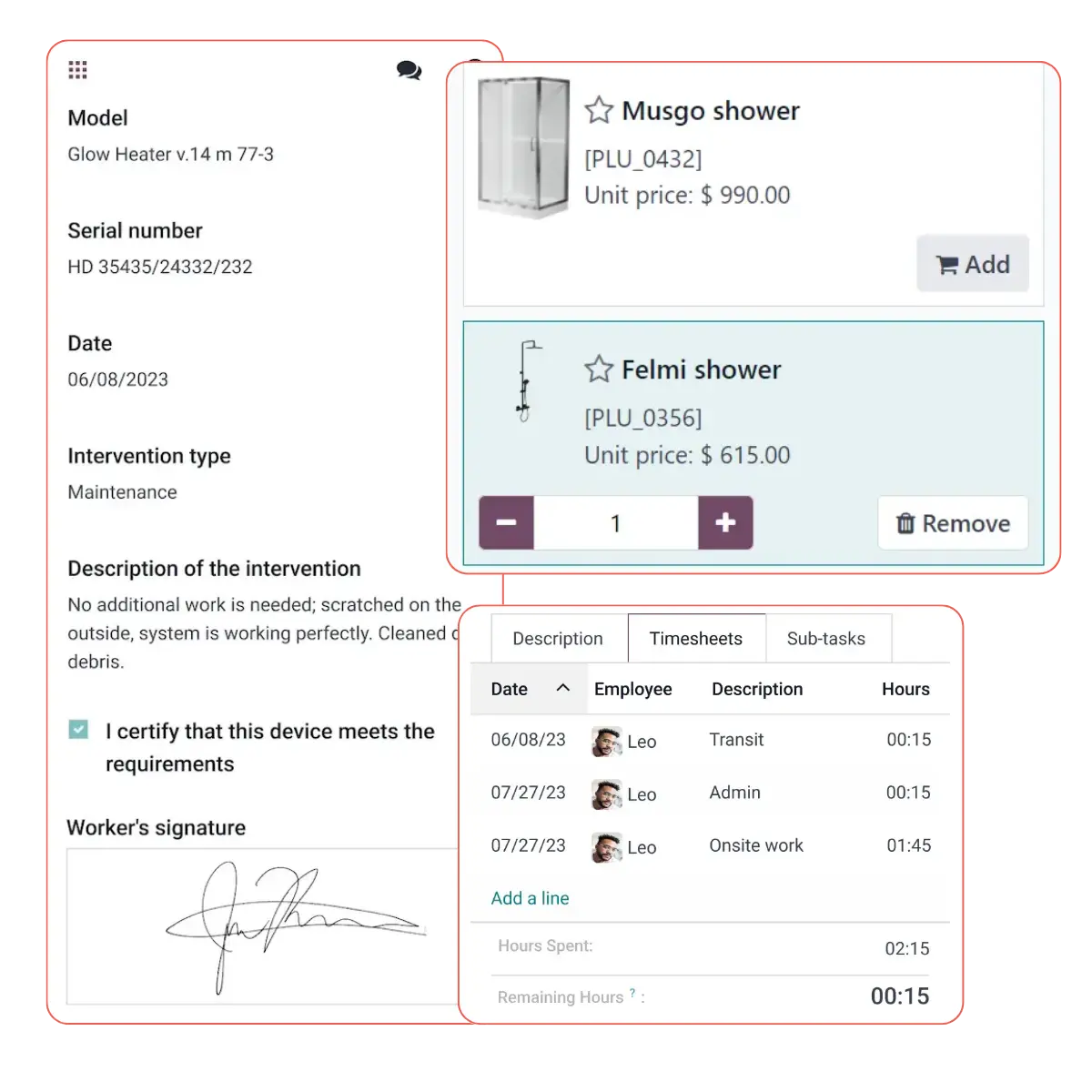
Odoo Field Service mobile app
Tasks can be filtered by region, team, or urgency. Coordinators use the calendar and map view to assign jobs efficiently. Technicians receive updates instantly and can focus on getting work done without paperwork.
Reports help managers track workload, time per tasks and daily performance, optimising resource planning and service improvement.
Odoo integrates your field teams with your back office
The Field Service app works best as part of an integrated Odoo setup. It shares data with:
- Inventory: Parts used are deducted from stock automatically.
- Accounting & Invoicing: Tasks generate draft invoices based on time and materials.
- Sales: Confirmed orders can create linked service jobs.
- Projects: Tasks feed into project timelines and progress tracking.
- Helpdesk: Issues can escalate to field visits without manual duplication.
- CRM: Client records include service history and upcoming work.
- Reporting: Track completion rates, response times, and service performance across the system.
This fully integrated ecosystem removes silos between field teams and back office systems.
Odoo integrates your field teams with your back office
Odoo Field Service works best as part of an integrated setup. Odoo has merged all features into the Planning app to avoid extra steps and fully centralise how you manage your on-site work.
It shares data with:
- Inventory: Used parts are deducted from stock automatically
- Accounting & Invoicing: Tasks generate draft invoices based on time and materials
- Sales: Confirmed orders can create linked service jobs
- Projects: Tasks feed into project timelines and progress tracking
- Helpdesk: Issues can escalate to field visits without manual duplication
- CRM: Client records include service history and upcoming work
- Reporting: Track completion rates, response times, and service performance across the system.
This fully integrated ecosystem removes silos between field teams and back office systems.
How to get started with Odoo Field Service
To work smoothly in daily operations, Odoo Field Service should be prepared with the right structures and links in place.
Start by defining service types and setting up consistent task templates. Each task should connect to the right product, whether it’s parts, time or a fixed fee.
How to get started with Odoo Field Service (LEGACY)
FYI: Because Field Service was merged into Odoo Planning as of v19.2, the specific setup below applies to legacy versions of the standalone Odoo Field Service app (Odoo 19.1 and prior).
To work smoothly in daily operations, Odoo Field Service should be prepared with the right structures and links in place.
Start by defining service types and setting up consistent task templates. Each task should connect to the right product, whether it’s parts, time or a fixed fee.
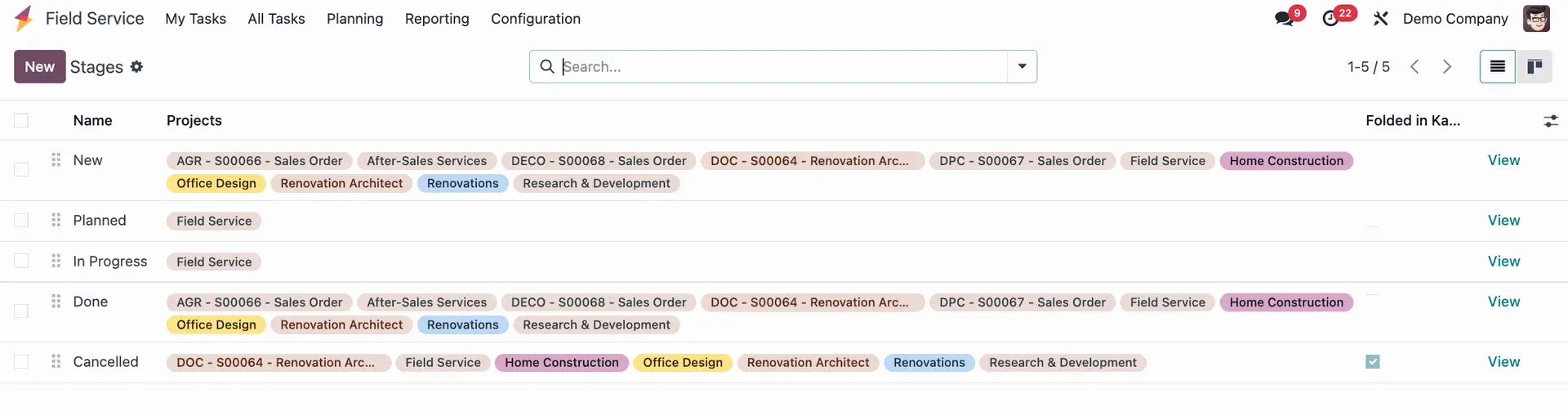
Odoo Field Service project stages per service and type
Before implementing, make sure to:
- Add all relevant services and parts to your product list
- Train technicians to log time, materials, and signatures in the app
- Test mobile usage in areas with weak network coverage
- Activate key apps like Inventory and Invoicing in advance.
This setup ensures tasks translate cleanly into timesheets, stock moves, and invoices without needing manual steps later.
Ready to take your field service to the next level with Odoo?
Odoo Field Service is just one part of a full business setup.
Connecting it with the right modules ensures tasks don’t get lost, parts don’t go untracked, and customers don’t go unbilled.
Reach out to our experts and discover how to tailor Odoo to your service projects.
Integrate your field service management with Odoo
Reach out to our experts and discover how to tailor Odoo to your field service projects.