Corporate security requirements have changed, and staying on top of them can make or break a business.
The main question from ERP users and auditors is no longer, “can you keep our data secure?” but “how can you prove it?”
Odoo is built with layers of security out of the box, but you need to know exactly where those technical controls stop and how to keep your setup compliant.
We broke down how Odoo handles compliance and the exact steps to make your system GDPR and ISO27001 ready.
Data protection requirements to stay GDPR & ISO compliant
Data protection regulations often converge on the same questions:
Who can access which data, and why?
What gets logged when that data changes?
How does the system respond when something goes wrong?
Who are the third parties touching your data?
Companies often rely on two main frameworks to secure personal data: ISO27001 and GDPR.
GDPR centres on data subject rights and accountability. You must know what personal data you hold, restrict who accesses it, respond to access and deletion requests, and prove all of it continuously by:
Maintaining a Record of Processing Activities (RoPA) that maps every data type, its purpose, legal basis, and retention period
Restricting access to personal data strictly to those with a documented need and being able to prove it
Responding to data subject requests (access, correction, deletion, portability) within 30 days, with a documented process behind every response
Detecting and reporting personal data breaches to supervisory authorities within 72 hours
Conducting Data Protection Impact Assessments (DPIAs) before deploying new processing activities that carry high risk
Ensuring every third party that touches personal data is bound by a signed Data Processing Agreement.
ISO27001 adds a management system layer. You need to identify information assets, assess risk, implement controls, and produce evidence of continuous improvement. To get ISO27001-certified, documenting decisions is just as important as a technically secure setup. In practice, that means:
Building and maintaining an information asset register that covers systems, data, and third-party relationships
Conducting formal risk assessments against each asset and documenting your treatment decisions
Implementing controls like access management, cryptography, physical security, supplier relationships, incident response, etc. and mapping each control to a documented risk
Running internal audits and management reviews on a defined schedule
Maintaining a Statement of Applicability that explains which controls you've implemented and why
Producing evidence of continuous improvement: closed nonconformities, updated risk registers, and reviewed policies.
These regulations and certifications are impossible to escape to meet corporate standards. Your Odoo should enforce them in the background, without adding any extra effort.
Odoo comes with built-in data security
Odoo's IT security architecture covers the core technical controls that any compliance framework needs.
To meet stringent laws like GDPR and ISO certifications, Odoo offers data security capabilities out of the box:
Odoo IT security feature | Business impact |
Access control: Over 4,000 CRUD (Create, Read, Update, Delete) permissions and 400 native record rules. | Enforces strict "least-privilege" access, drastically reducing the risk of internal data leaks. |
Identity management: Native SSO integration with Entra ID, Active Directory, Google, Keycloak, and OAuth2; Two-Factor Authentication (2FA). | Prevents unauthorised access and compromised passwords from breaching your core financial data. |
Audit trails: Field-level change tracking with timestamp and user attribution on any model. | Creates an unbreakable audit trail so you can prove to auditors exactly who changed client data and when. |
Data minimisation: Automatic archiving anonymises records no longer required; record rules restrict each user to what their role needs. | Reduces legal liability and data exposure. You only hold the personal data strictly necessary for active business operations. |
Data subject rights: Personal data is centralised in one module, making access requests and right-to-delete responses manageable. | Reduces the administrative burden of GDPR compliance, and quickly fulfils the "right to be forgotten" requests. |
Data anonymisation: The native data cleaning module replaces personal data fields with masked or randomised values. | Ensures your testing environments are safe, keeping live customer data away from external users or developers. |
Odoo IT security guide for data compliance
To help you structure your Odoo implementation for compliance, we broke the work down into five areas. Each one maps to specific compliance controls and addresses a different threat.
1. Identity & access
Define user groups in Odoo’s settings strictly by job function, not per individual (Settings → Users & Companies → Groups)
Apply record rules to enforce data minimisation at the row level, and enforce Two-Factor Authentication (2FA) for all privileged accounts
Finally, build offboarding into your HR process so departing employees trigger an automatic access review
Set this up via Settings → Technical → Automated Actions, for example, to deactivate user accounts when an employee is archived or create a checklist in the Knowledge app.
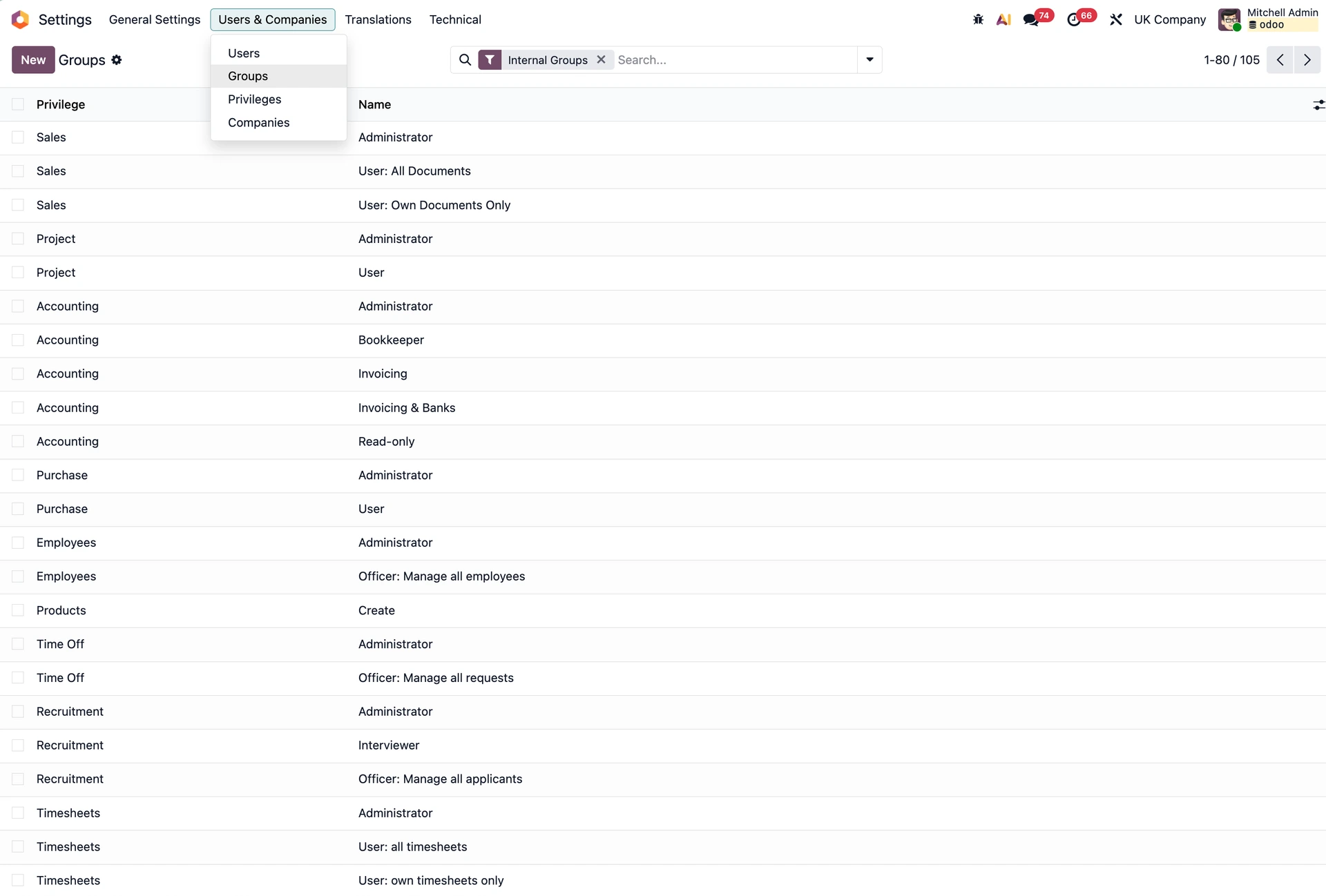
User groups in Odoo Settings
2. Data governance
Identify which Odoo models hold personal data and enable field-level tracking (Settings → Technical → Database Structure Fields), so any changes made to a field like address or salary are recorded in chatter with the user's name, timestamp, and the before/after values
Configure retention rules so data is anonymised or deleted once it is no longer legally required
Centralise your personal data management so access and deletion requests can be handled swiftly in one place.
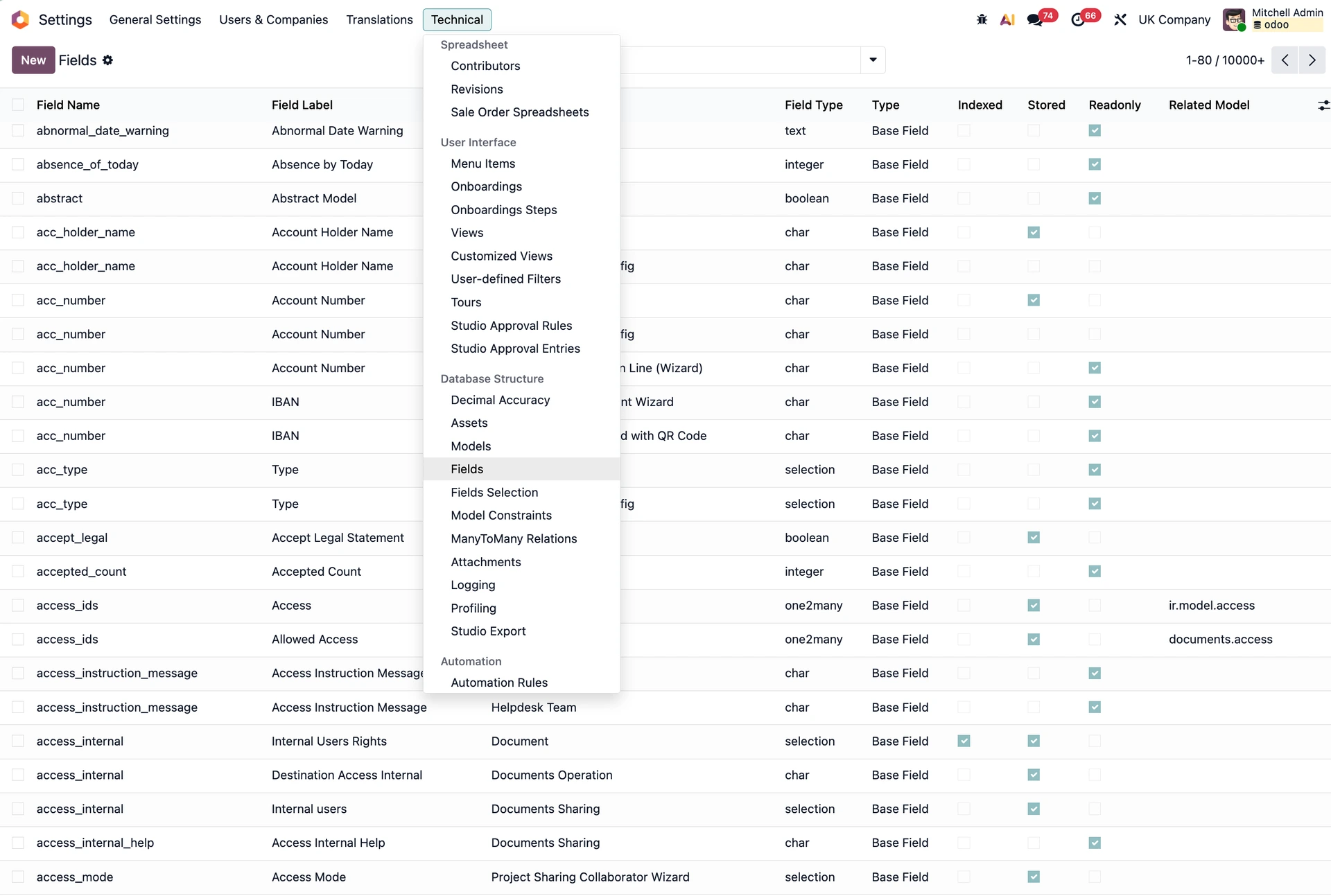
Fields in Odoo Settings
3. Infrastructure security
Use completely separate environments for development, staging, and production
Never push custom code directly to a live database
Maintain regular backups, and more importantly, run drills to verify that your restore procedures are foolproof.
4. Third-party risk management
Maintain a register of every third party with access to your data
Confirm that Data Processing Agreements (DPAs) are signed and securely stored
Repeat this review process every time you add a new third-party integration to your Odoo environment.
5. Audit and evidence
Documentation is the currency of compliance. Document your quarterly access reviews, conduct routine risk assessments, and save all control decisions. If it isn't documented for auditors, it didn't happen. In practice, that means building evidence directly into your Odoo workflow rather than treating it as a separate task:
Use Odoo's scheduled activities to trigger quarterly access reviews and log outcomes directly as internal notes
Export field tracking logs from sensitive models before each audit cycle and store them outside Odoo
Use AI tools to draft risk assessment descriptions or summarise access review findings, as it cuts the documentation burden while human sign-off is still required.
Odoo IT security configuration checklist
These are key Odoo IT security configurations that make the biggest difference in an audit and are most often missing from standard implementations:
Enable Two-Factor Authentication for all admin, finance, and HR accounts (it is available natively but turned off by default)
Restrict bulk export rights in user group settings to block mass data exfiltration
Enable field tracking on sensitive models like res.partner, hr.employee, account.move, and any custom models handling personal data
Configure short session timeouts to log out idle users automatically
Use scoped API keys per integration instead of sharing generic admin credentials with third-party apps
Verify staging data: so your testing environments strictly use anonymised data via the Data Cleaning module
Never make a direct copy of your live production database.
Odoo’s blind spots & the future of data protection with AI
Odoo covers the core controls, but some compliance setups still require additional configuration or more customised process documentation:
No user data management: access, correction, and deletion requests need a documented procedure or custom portal
No SIEM (Security Information and Event Management) logging: structured security event logs for Sentinel or Splunk require infrastructure-level forwarding from Nginx, PostgreSQL, and system logs
No vendor risk register: ISO27001 requires documented third-party risk assessment; a custom register with signed DPAs is the standard workaround
Consent management isn’t managed by default: B2C campaigns and website forms need explicit configuration
Bulk export rights are too broad: most users can export to CSV or Excel unless explicitly restricted; this is consistently flagged in audits.
AI features also create a parallel compliance obligation.
When a user triggers Ask AI on a customer record, that data reaches an external model provider.
Under GDPR Article 28, this is a third-party relationship requiring a DPA and, if the provider sits outside the EEA, a valid transfer mechanism.
AI assistants also inherit the triggering user's permissions, meaning a broad-access user continuously sends data to an external system with no entry in your standard audit trail.
Our rule of thumb? Treat active AI features as a separate asset class: documented, access-controlled by user group, and reviewed before rollout.
Odoo IT Security FAQs
Can Odoo be configured for full GDPR and ISO27001 compliance?
Yes. Odoo provides the technical framework needed for compliance, including role-based access control, field-level audit trails, and two-factor authentication. Achieving full compliance requires configuring specific settings, such as data retention rules, field tracking on sensitive models, and restricted export permissions.
How does Odoo enforce user access control?
Odoo manages access using a least-privilege model based on user groups and record rules. It features over 4,000 CRUD (Create, Read, Update, Delete) permissions to restrict module-level access and 400 native record rules to filter data visibility at the row level by job function or company entity.
Does Odoo automatically encrypt and secure sensitive customer data?
Yes. Odoo uses database-level access controls and supports native Two-Factor Authentication (2FA) alongside SSO integration via providers like Entra ID and OAuth2. It also includes native data anonymisation modules to mask personal data before syncing production databases to staging or test environments.
Discuss your Odoo IT security setup for compliance
We hold the ISO27001 certification and have implemented Odoo setups for highly regulated industries like MedTech, manufacturing, and more.
If you're working through the same process, our experts can help you build a fully compliant Odoo.