Die Sicherheitsanforderungen an Unternehmen haben sich verändert, und wer hier den Anschluss verliert, riskiert sein Geschäft.
Die zentrale Frage von ERP-Anwendern und Auditoren lautet längst nicht mehr „Können Sie Daten schützen?", sondern „Wie können Sie es belegen?"
Odoo bringt von Haus aus mehrere Sicherheitsebenen mit. Sie müssen allerdings genau wissen, wo diese technischen Kontrollen enden – und wie Sie Ihr System dauerhaft compliant halten.
Wir haben aufgeschlüsselt, wie Odoo mit Compliance umgeht und welche Schritte nötig sind, um Ihr System DSGVO- und ISO-27001-fähig zu machen.
Datenschutzanforderungen nach DSGVO und ISO27001
Datenschutzvorgaben laufen fast immer auf dieselben Fragen hinaus:
Wer darf auf welche Daten zugreifen – und warum?
Was wird protokolliert, wenn sich diese Daten ändern?
Wie reagiert das System, wenn etwas schiefgeht?
Welche Dritten kommen mit Ihren Daten in Berührung?
Zum Schutz personenbezogener Daten stützen sich Unternehmen meist auf zwei Rahmenwerke: ISO 27001 und die DSGVO.
Die DSGVO stellt Betroffenenrechte und Rechenschaftspflicht in den Mittelpunkt. Sie müssen wissen, welche personenbezogenen Daten Sie verarbeiten, den Zugriff darauf beschränken, auf Auskunfts- und Löschersuchen reagieren – und all das lückenlos nachweisen können:
Führen Sie ein Verzeichnis von Verarbeitungstätigkeiten (VVT), das jede Datenkategorie mit Zweck, Rechtsgrundlage und Aufbewahrungsfrist erfasst.
Beschränken Sie den Zugriff auf personenbezogene Daten strikt auf Personen mit dokumentiertem Bedarf – und weisen Sie das auch nach.
Beantworten Sie Betroffenenanfragen (Auskunft, Berichtigung, Löschung, Datenübertragbarkeit) innerhalb von 30 Tagen, mit einem dokumentierten Prozess hinter jeder Antwort.
Erkennen und melden Sie Verletzungen des Schutzes personenbezogener Daten innerhalb von 72 Stunden an die Aufsichtsbehörde.
Führen Sie Datenschutz-Folgenabschätzungen (DSFA) durch, bevor Sie neue Verarbeitungstätigkeiten mit hohem Risiko einführen.
Stellen Sie sicher, dass jeder Dritte, der personenbezogene Daten verarbeitet, durch einen unterzeichneten Auftragsverarbeitungsvertrag (AVV) gebunden ist.
ISO 27001 ergänzt das um eine Managementsystem-Ebene. Sie müssen Informationswerte identifizieren, Risiken bewerten, Maßnahmen umsetzen und die kontinuierliche Verbesserung nachweisen. Für eine ISO-27001-Zertifizierung ist die Dokumentation Ihrer Entscheidungen genauso wichtig wie die technisch saubere Umsetzung. Konkret bedeutet das:
Aufbau und Pflege eines Verzeichnisses der Informationswerte, das Systeme, Daten und Beziehungen zu Dritten abdeckt.
Formale Risikobewertungen für jeden Wert – inklusive dokumentierter Entscheidungen zur Risikobehandlung.
Umsetzung von Maßnahmen wie Zugriffsmanagement, Kryptografie, physische Sicherheit, Lieferantenbeziehungen oder Incident Response, wobei jede Maßnahme einem dokumentierten Risiko zugeordnet wird.
Interne Audits und Managementbewertungen nach einem festgelegten Zeitplan.
Pflege einer Erklärung zur Anwendbarkeit (Statement of Applicability), die darlegt, welche Maßnahmen Sie umgesetzt haben und warum.
Nachweise für kontinuierliche Verbesserung: geschlossene Abweichungen, aktualisierte Risikoregister und überprüfte Richtlinien.
An diesen Vorgaben und Zertifizierungen führt kein Weg vorbei, wenn Sie professionellen Ansprüchen genügen wollen. Ihr Odoo sollte sie im Hintergrund durchsetzen – ohne zusätzlichen Aufwand.
Was Odoo schon kann
Die Sicherheitsarchitektur von Odoo deckt die grundlegenden technischen Kontrollen ab, die jedes Compliance-Rahmenwerk voraussetzt.
Um strengen Vorgaben wie der DSGVO und ISO-Zertifizierungen gerecht zu werden, bietet Odoo folgende Funktionen ab Werk:
Odoo-Sicherheitsfunktion | Nutzen für Ihr Unternehmen |
Zugriffskontrolle: über 4.000 CRUD-Berechtigungen (Create, Read, Update, Delete) und 400 native Datensatzregeln. | Setzt das Least-Privilege-Prinzip konsequent durch und senkt das Risiko interner Datenlecks deutlich. |
Identitätsmanagement: native SSO-Anbindung an Entra ID, Active Directory, Google, Keycloak und OAuth2; Zwei-Faktor-Authentifizierung (2FA). | Verhindert unbefugte Zugriffe und schützt Ihre Finanzdaten vor kompromittierten Passwörtern. |
Audit-Trails: Änderungsverfolgung auf Feldebene mit Zeitstempel und Benutzerzuordnung für jedes Modell. | Schafft einen lückenlosen Prüfpfad – Sie können Auditoren exakt belegen, wer wann welche Kundendaten geändert hat. |
Datenminimierung: automatische Archivierung anonymisiert nicht mehr benötigte Datensätze; Datensatzregeln beschränken jeden Benutzer auf das, was seine Rolle erfordert. | Reduziert Haftungsrisiken und Datenexposition. Sie speichern nur die personenbezogenen Daten, die für den laufenden Betrieb zwingend nötig sind. |
Betroffenenrechte: personenbezogene Daten sind in einem Modul gebündelt, was Auskunfts- und Löschanfragen handhabbar macht. | Senkt den Verwaltungsaufwand der DSGVO-Compliance und erfüllt „Recht auf Vergessenwerden"-Anfragen schnell. |
Anonymisierung: das native Modul zur Datenbereinigung ersetzt personenbezogene Felder durch maskierte oder zufällige Werte. | Macht Ihre Testumgebungen sicher und hält echte Kundendaten von externen Nutzern und Entwicklern fern. |
Odoo compliant einrichten: 5 Bereiche
Damit Sie Ihre Odoo-Implementierung compliant aufsetzen können, haben wir die Arbeit in fünf Bereiche gegliedert. Jeder Bereich ist bestimmten Compliance-Anforderungen zugeordnet und adressiert eine eigene Bedrohung.
1. Identität und Zugriff
Definieren Sie Benutzergruppen in den Odoo-Einstellungen strikt nach Funktion, nicht pro Person (Einstellungen → Benutzer & Unternehmen → Gruppen).
Setzen Sie Datensatzregeln ein, um Datenminimierung auf Zeilenebene durchzusetzen, und machen Sie die Zwei-Faktor-Authentifizierung (2FA) für alle privilegierten Konten verpflichtend.
Verankern Sie das Offboarding in Ihren HR-Prozessen, sodass ausscheidende Mitarbeitende automatisch eine Zugriffsprüfung auslösen.
Richten Sie das über Einstellungen → Technisch → Automatisierte Aktionen ein – etwa um Benutzerkonten zu deaktivieren, sobald ein Mitarbeitender archiviert wird – oder legen Sie eine Checkliste in der Knowledge-App an.
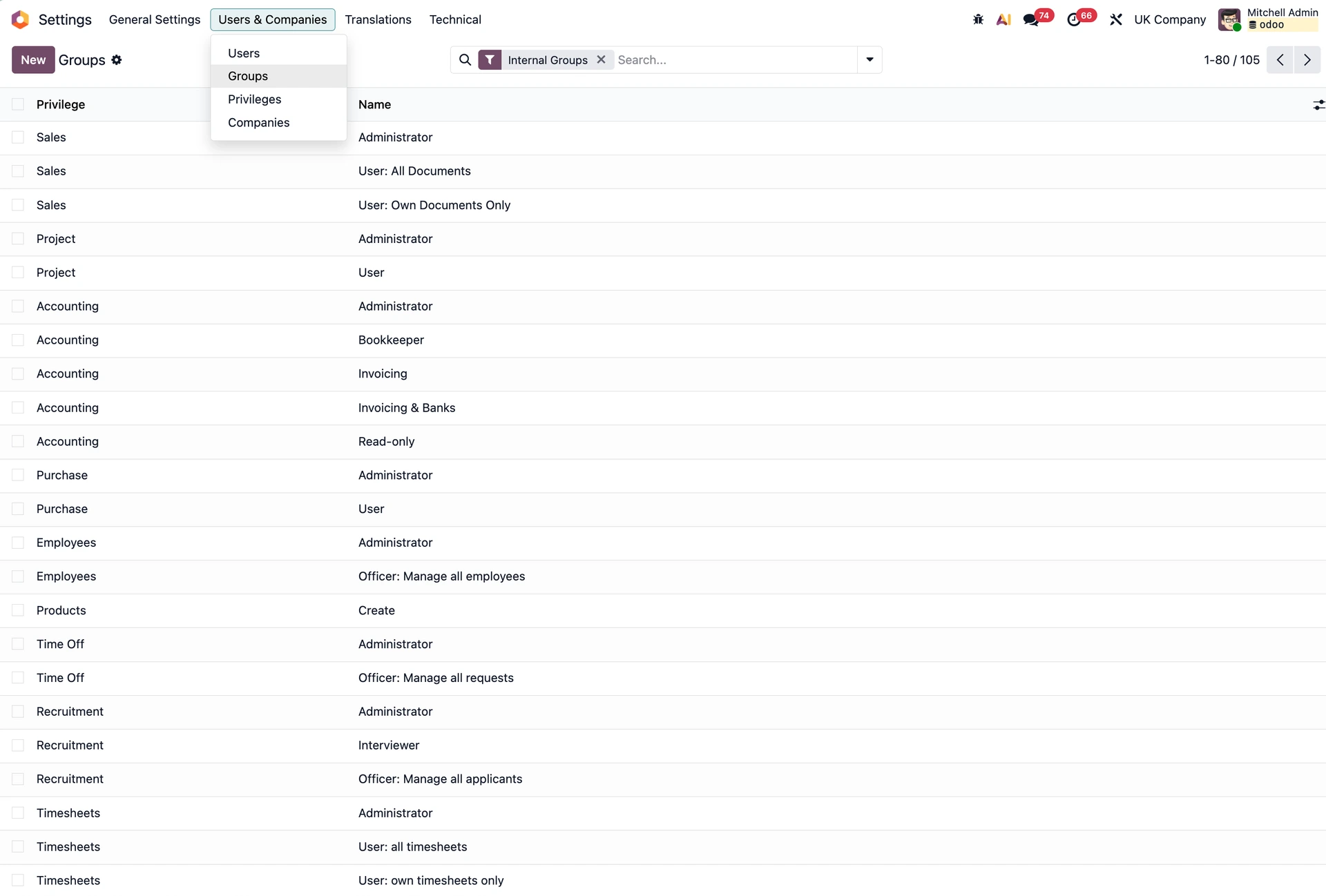
Benutzergruppen in den Odoo-Einstellungen
2. Data Governance
Ermitteln Sie, welche Odoo-Modelle personenbezogene Daten enthalten, und aktivieren Sie die Nachverfolgung auf Feldebene (Einstellungen → Technisch → Datenbankstruktur → Felder). Änderungen an Feldern wie Adresse oder Gehalt werden dann im Chatter mit Benutzername, Zeitstempel und Vorher-/Nachher-Werten protokolliert.
Konfigurieren Sie Aufbewahrungsregeln, sodass Daten anonymisiert oder gelöscht werden, sobald sie rechtlich nicht mehr erforderlich sind.
Bündeln Sie die Verwaltung personenbezogener Daten an einer Stelle, damit Auskunfts- und Löschanfragen zügig bearbeitet werden können.
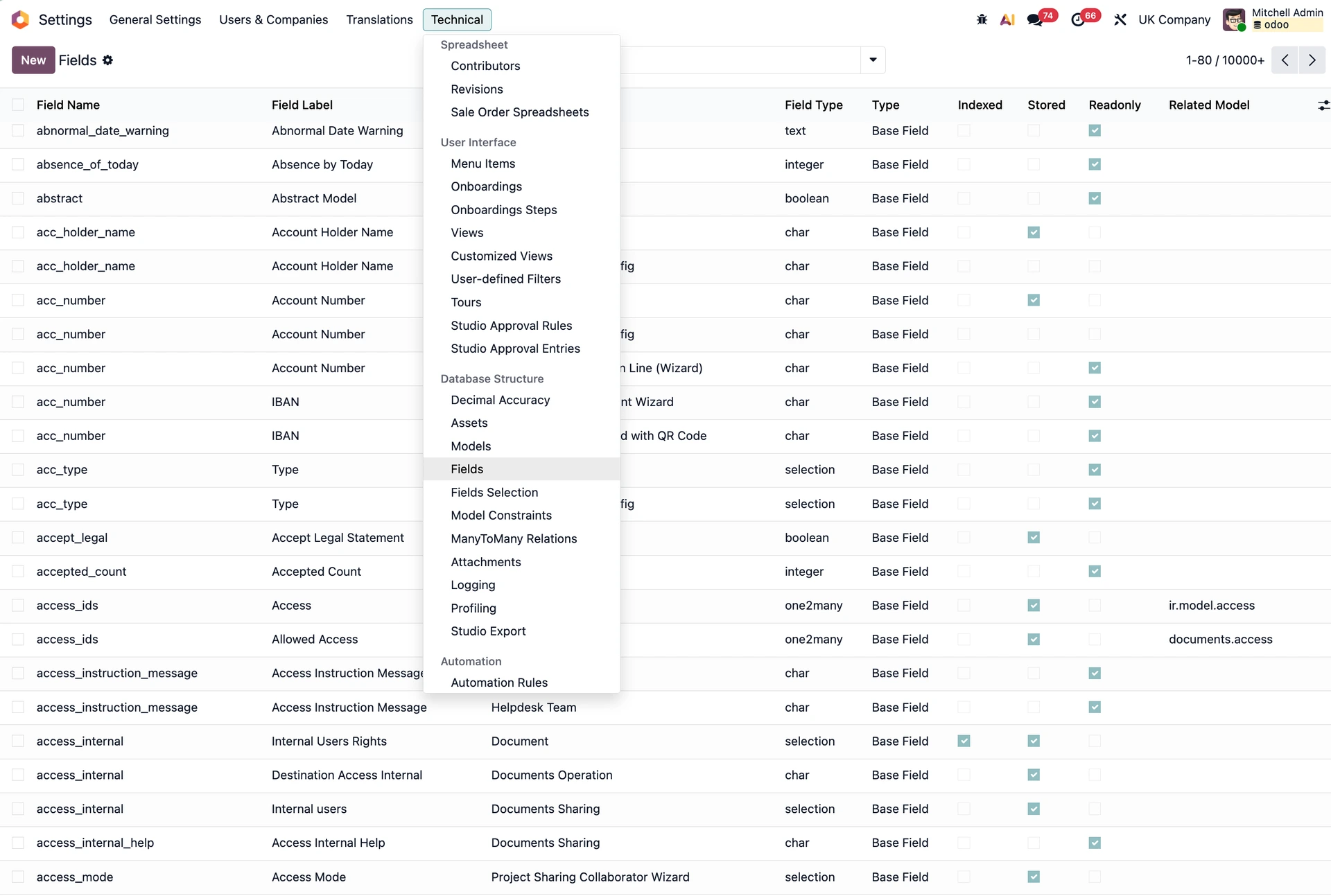
Felder in den Odoo-Einstellungen
3. Infrastruktursicherheit
Nutzen Sie vollständig getrennte Umgebungen für Entwicklung, Staging und Produktion.
Spielen Sie niemals eigenen Code direkt in eine Live-Datenbank ein.
Erstellen Sie regelmäßige Backups – und testen Sie vor allem in Übungen, ob Ihre Wiederherstellungsverfahren wirklich funktionieren.
4. Management von Drittanbieterrisiken
Führen Sie ein Register aller Dritten, die Zugriff auf Ihre Daten haben.
Stellen Sie sicher, dass Auftragsverarbeitungsverträge (AVV) unterzeichnet und sicher abgelegt sind.
Wiederholen Sie diese Prüfung bei jeder neuen Drittanbieter-Integration in Ihrer Odoo-Umgebung.
5. Audit und Nachweise
Dokumentation ist die Währung der Compliance. Halten Sie Ihre quartalsweisen Zugriffsprüfungen fest, führen Sie regelmäßige Risikobewertungen durch und sichern Sie alle getroffenen Entscheidungen. Was für Auditoren nicht dokumentiert ist, hat nie stattgefunden. In der Praxis heißt das: Bauen Sie die Nachweisführung direkt in Ihre Odoo-Workflows ein, statt sie als separate Aufgabe zu behandeln:
Nutzen Sie geplante Aktivitäten in Odoo, um quartalsweise Zugriffsprüfungen anzustoßen und die Ergebnisse direkt als interne Notiz zu protokollieren.
Exportieren Sie vor jedem Audit-Zyklus die Änderungsprotokolle sensibler Modelle und lagern Sie sie außerhalb von Odoo.
Setzen Sie KI-Tools ein, um Risikobewertungen vorzuformulieren oder Ergebnisse von Zugriffsprüfungen zusammenzufassen. Das senkt den Dokumentationsaufwand – die finale Freigabe durch einen Menschen bleibt aber Pflicht.
Die Konfigurations-Checkliste
Diese Einstellungen machen im Audit den größten Unterschied – und fehlen in Standard-Implementierungen am häufigsten:
Zwei-Faktor-Authentifizierung für alle Admin-, Finanz- und HR-Konten aktivieren (nativ verfügbar, aber standardmäßig deaktiviert).
Massenexport-Rechte in den Gruppeneinstellungen einschränken, um großflächige Datenabflüsse zu unterbinden.
Feld-Tracking für sensible Modelle wie res.partner, hr.employee, account.move sowie alle eigenen Modelle mit personenbezogenen Daten aktivieren.
Kurze Session-Timeouts konfigurieren, damit inaktive Benutzer automatisch abgemeldet werden.
Eigene API-Schlüssel pro Integration verwenden, statt generische Admin-Zugangsdaten mit Drittanbieter-Apps zu teilen.
Staging-Daten prüfen: Testumgebungen dürfen ausschließlich mit anonymisierten Daten aus dem Datenbereinigungs-Modul arbeiten.
Niemals eine 1:1-Kopie Ihrer Produktivdatenbank anlegen.
Wo Odoo noch an Grenzen stößt (+ das KI-Thema)
Odoo deckt die zentralen Kontrollen ab – einige Compliance-Anforderungen erfordern jedoch zusätzliche Konfiguration oder individuelle Prozessdokumentation:
Keine Verwaltung von Betroffenenanfragen: Auskunfts-, Berichtigungs- und Löschersuchen brauchen ein dokumentiertes Verfahren oder ein eigenes Portal.
Kein SIEM-Logging: Strukturierte Sicherheitsereignisse für Sentinel oder Splunk erfordern eine Weiterleitung auf Infrastrukturebene aus Nginx, PostgreSQL und den Systemlogs.
Kein Lieferantenrisiko-Register: ISO 27001 verlangt eine dokumentierte Risikobewertung für Dritte; ein eigenes Register mit unterzeichneten AVVs ist die übliche Lösung.
Einwilligungsmanagement fehlt standardmäßig: B2C-Kampagnen und Website-Formulare müssen explizit konfiguriert werden.
Zu weit gefasste Exportrechte: Die meisten Benutzer können ohne ausdrückliche Einschränkung nach CSV oder Excel exportieren – ein Punkt, der in Audits regelmäßig bemängelt wird.
Auch KI-Funktionen bringen eine eigene Compliance-Pflicht mit sich.
Sobald ein Benutzer „Ask AI" auf einem Kundendatensatz auslöst, gelangen diese Daten zu einem externen Modellanbieter.
Nach Art. 28 DSGVO handelt es sich dabei um eine Auftragsverarbeitung, die einen AVV erfordert – und, falls der Anbieter außerhalb des EWR sitzt, zusätzlich einen gültigen Übermittlungsmechanismus.
KI-Assistenten übernehmen zudem die Berechtigungen des auslösenden Benutzers. Ein Nutzer mit weitreichendem Zugriff sendet damit laufend Daten an ein externes System, ohne dass dies in Ihrem regulären Audit-Trail auftaucht.
Unsere Faustregel: Behandeln Sie aktive KI-Funktionen als eigene Asset-Klasse – dokumentiert, nach Benutzergruppen zugriffsbeschränkt und vor dem Rollout geprüft.
Sprechen wir über Ihr Setup
Wir sind nach ISO 27001 zertifiziert und haben Odoo-Systeme für stark regulierte Branchen wie MedTech und die Fertigungsindustrie umgesetzt.
Wenn Sie vor derselben Aufgabe stehen, unterstützen Sie unsere Expertinnen und Experten beim Aufbau eines vollständig compliant aufgesetzten Odoo.