Odoo AI is the AI app built into Odoo Enterprise since Odoo 19. It adds AI agents, AI fields and content tools across all apps. In Odoo 20, agents also run in automations and scheduled actions, take voice requests and create records, AI usage consumes in-app credits, and a native MCP server connects external assistants. The common thread: AI.
Odoo AI was first shown in full at Odoo Experience 2025, as the newly released and highly anticipated app that integrates AI across the system.
Odoo’s founder Fabien Pinckaers spread the release across two keynote sessions and a dedicated AI talk.
The topic resonated across the entire talk agenda - from Odoo product owners to experts in the community.
Below, we show the AI features of Odoo 19 in action, what Odoo 20 adds, and how Odoo is staying ahead of the AI and ERP curve.
How does Odoo AI change everyday work?
Odoo users have been able to use AI features since version 17 with OCR invoice, automated replenishment, and ChatGPT integrations.
This was expanded in version 18 with AI-powered chats to create text and summarise content, information parsing in documents or predictive analysis.
AI functionalities in Odoo so far have been practical. Users could use AI features within each app, with some features that were applicable to processes within an app.
Odoo 19 changes that dynamic. AI is not only present across all applications in specific features, it is also consolidated into a dedicated app.
This means that Odoo users now get AI embedded directly into every standard process across their entire database, while getting features specific to each business area across all applications.
With Odoo 19, AI became not only more prolific across the system but also more centralised and simplified.
Sales teams can generate leads through AI-powered live chat, accountants can query records in plain language, HR can transcribe meetings in real time, and website managers can generate new pages and SEO data.
Odoo 19 introduces a system where AI is not an extra feature but a part of the daily workflow.
What can Odoo AI do in Odoo 19 and Odoo 20?
Odoo 19 put AI everywhere, and Odoo 20 builds on it. Here’s everything that Odoo users can do with the newest features from the AI app and beyond:
Which AI models and sources does Odoo AI use?
To get started with Odoo AI, you choose ChatGPT (OpenAI) or Gemini (Google) as the AI provider. In Odoo 20, Odoo then picks the best model for each task, and AI requests consume credits bought through in-app purchases (IAP).
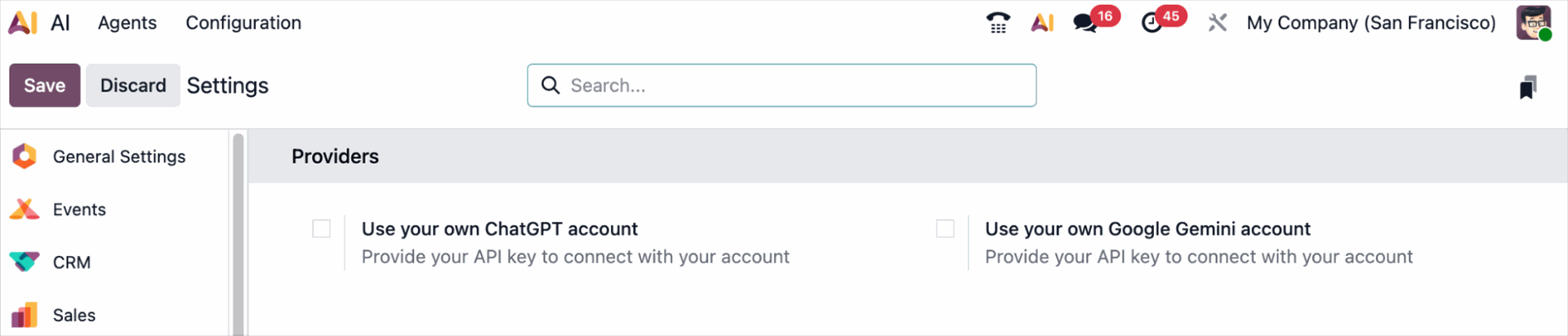
Odoo can get your AI-generated answers from documents, knowledge articles, website links, or PDFs.
You can also configure default prompts and assign agents depending on the context of each request via automated actions.
What are Odoo AI agents?
Odoo 19 has introduced customisable AI agents. These are built-in assistants that you can use anywhere in Odoo, from chatbots to text composers or any other editable fields.
You can add chats with AI agents that learn from documents and perform actions, usable internally or integrated with the website and external applications.
AI agents can also be configured with company data, allowing users to ask questions and retrieve information from internal documents or through a Live Chat operator.
In Odoo 19, you can configure various types of AI agents, with different models and for various use cases:
- A general Ask AI agent that works across your Odoo system
- An agent for your Live Chat, where users can have their queries answered based on internal information
- A compliance agent to answer legal questions regarding Odoo
- A variety of other AI agents that you can configure to your needs and with your preferred models.
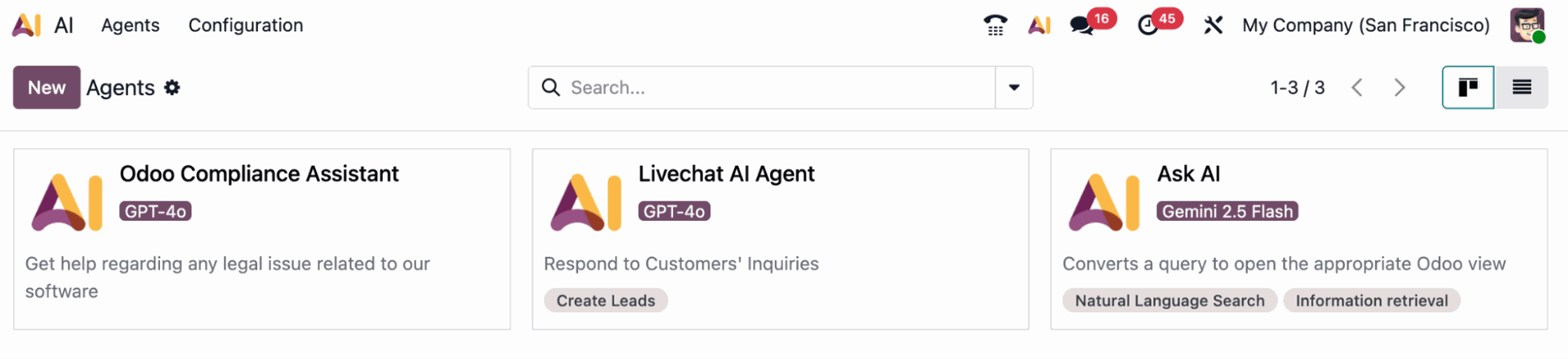
An Odoo AI button is now available in the top bar, so you can open an AI agent wherever you’re working in Odoo.

You can connect an AI agent to Live Chat, where it can also generate leads.

AI agents can recognise which data entry you are in and detect it to adapt prompts for each use case. In Odoo 20, agents can also run on their own when an automation rule is triggered or at a scheduled time, and create or update records from a typed, spoken or PDF instruction.
How does Odoo AI analyse and search data?
With Odoo 19, users can generate dynamic reports with AI. Instead of having to analyse the data and compile the reports manually, you can open your AI agent, prompt it to analyse your data, and it will immediately render a visualised graph with those insights.
You can also use AI to fill in fields, including bulk data entries, and write queries as you speak, which AI transforms into filterable records. For example, you can request a percentage increase in salaries to be applied in bulk to all your employees.
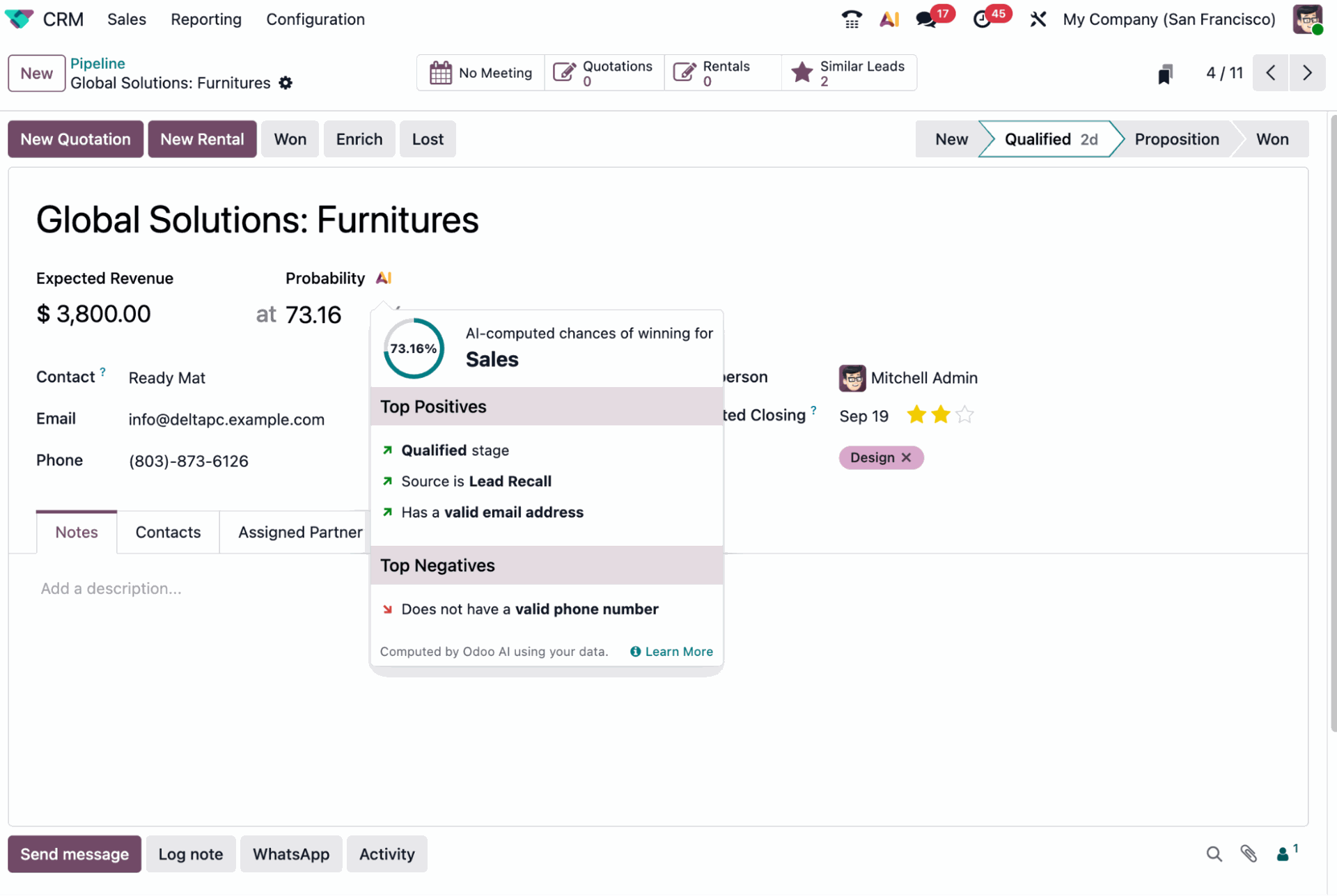
Users can also estimate lead probability with AI, including explanations based on past data.
On top of this, you can also get AI suggestions in the product catalogue, based on stock and replenishment.
Odoo’s new AI app lets you perform anything from simple queries to complex requests.
This means that in a few clicks, you can complete simple tasks like replenishing stock based on predictions or execute full data analyses to create visualised charts based on several variables.
The options with Odoo AI are endless. You just need to start making the most of its capabilities and develop use cases for your own business
How does Odoo AI help with content? Content & communication
With Odoo AI, you can draft emails, improve text, or summarise chatter, including prompts embedded in email templates for single or bulk sending.
You can also sort documents and trigger actions based on prompts, transcribe meetings or dictations in real time and generate meeting summaries.
With Odoo 19, you can create new website pages or rewrite sections with AI, supported by AI building blocks and an “Ask AI” question field.
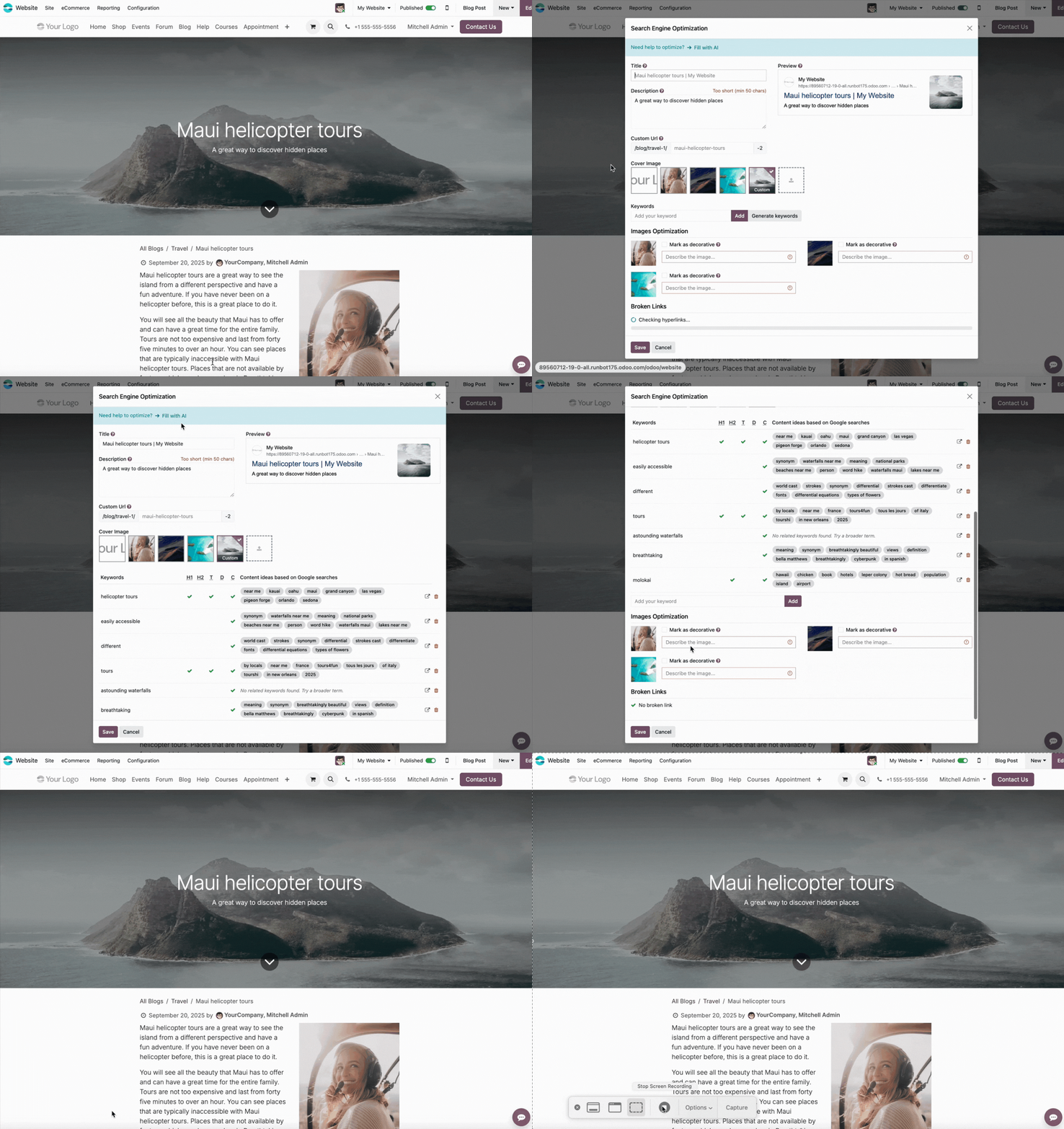
SEO fields can now be automatically filled with AI, including meta tags, descriptions, and keywords. On top of that, you can also directly translate content with AI sidekick translations.
Why is Odoo AI the biggest product shift in years?
The launch of the Odoo AI app is comparable in scale to the UX redesign between versions 16 and 17.
But while that release focused on how users saw the platform, Odoo 19 shifts attention to what the system can do for them.
With this, AI has become an indispensable part of everyday workflows: an agent in the corner of the screen, a prediction button in CRM, or chatbots integrated into text and data fields.
Adding AI to ERP is not new. Many other key players in the ERP market also offer assistants, often through external integrations.
Still, Odoo’s approach stands out. It builds AI in-house and embeds it directly into the core system. Odoo 20 also opens the database to outside assistants: its native MCP server lets tools such as Claude or ChatGPT work with Odoo data under the user's access rights, read-only by default.
Industry research underlines the value of this direction. An IBM report showed that embedded AI, developed close to the data, enables faster adoption and stronger results.
Another MIT study found that in-house AI tools outperform external add-ons over time.
Odoo’s decision to launch its own AI app and integrated features reflects this.
It breaks from the idea of AI as a trendy but optional add-on and positions it as an integral part of the ERP backbone.
Odoo AI FAQs
What is Odoo AI?
Odoo AI is the AI app built into Odoo Enterprise since Odoo 19. It adds configurable AI agents, AI fields, document sorting, text tools and voice transcription across all apps, so users can ask questions, summarise records and act on data without leaving Odoo. Our technical guide explains how it works.
What is new in Odoo AI with Odoo 20?
In Odoo 20, AI agents can run on their own when an automation rule is triggered or at a scheduled time, accept voice requests, and create or update records, even from a PDF. Odoo also picks the best model per task, and a native MCP server connects external assistants. See all Odoo 20 features.
Does Odoo AI cost extra?
Yes, beyond the licence. Odoo AI requires Odoo Enterprise, and in Odoo 20 every AI feature consumes credits that you buy through Odoo’s in-app purchases (IAP). Costs therefore grow with how often your team and your automated agents call the AI, so start with a few high-value use cases and monitor credit usage.
Which AI models does Odoo AI use?
When you configure an AI agent, you choose ChatGPT (OpenAI) or Gemini (Google) as the provider. In Odoo 20, Odoo then selects the best model from that provider for each task automatically. You also set a response style, a system prompt and the sources the agent may answer from.
What is the difference between Odoo AI and the Odoo MCP server?
Odoo AI runs inside Odoo: your team uses its agents in apps, chats and automations. The native Odoo 20 MCP server lets external assistants such as Claude or ChatGPT connect to your database instead. It respects user access rights and stays read-only until an administrator enables write actions. Compare both options.
Where does Odoo AI still fall short?
In our hands-on tests, Odoo AI works best on queries about one topic or module at a time. It still struggles with complex requests that combine data from several modules, so check multi-app reports before relying on them. Summaries, natural-language reporting and email drafts work well. Read what works and what needs work.
How do I get started with Odoo AI?
Use an Odoo 19 or Odoo 20 Enterprise database, open the AI app and create an agent: pick a provider, write a system prompt and add sources such as files, links, Documents or Knowledge articles. Start with one narrow use case, like answering questions from internal documents. Follow our step-by-step tutorial.
Let’s discuss how AI can optimise your Odoo processes
Odoo 19 and Odoo 20 bring AI into everyday workflows.
Contact our experts and see how Odoo 20 can be tailored to your business & extended with Odoo AI automated actions.