Writing emails is a basic part of everyday work, yet it takes up a lot of time.
Particularly, finding the right context for each customer and ensuring all relevant information is included often takes longer than expected.
This is especially true when you have just taken over a process or need to respond to a customer quickly.
See how Odoo AI automatically turns your record data into context-sensitive follow-up messages with actionable points.
In Odoo 19, AI becomes your personal email assistant
Following up with a customer requires context knowledge of their project history, current status, and open topics.
With Odoo AI, you briefly describe what you need to know from the customer and what you need to provide on your end.
It then translates your request into the perfect email reply, ready to send with one click.
Creating follow-up messages with Odoo AI lets you:
- Save time: You can move from an idea to a finished email in seconds instead of minutes
- Create context-sensitive drafts: The AI automatically pulls relevant info like customer names, project statuses, meeting minutes, and action points directly from the record
- Maintain full control: The AI provides a suggestion, but the final check and the actual sending are always handled by the human
- Ensure consistent communication: You can tailor your AI Agents to maintain professional wording and a consistent brand voice, even when you are working under pressure.
Odoo 19 introduced AI Agents for various use cases
In version 19, Odoo introduced more autonomous AI with built-in agents like Ask AI, Odoo Agent, Compliance Assistant, and Livechat Agent. It also gave users the tools to build their own agentic AI workflows
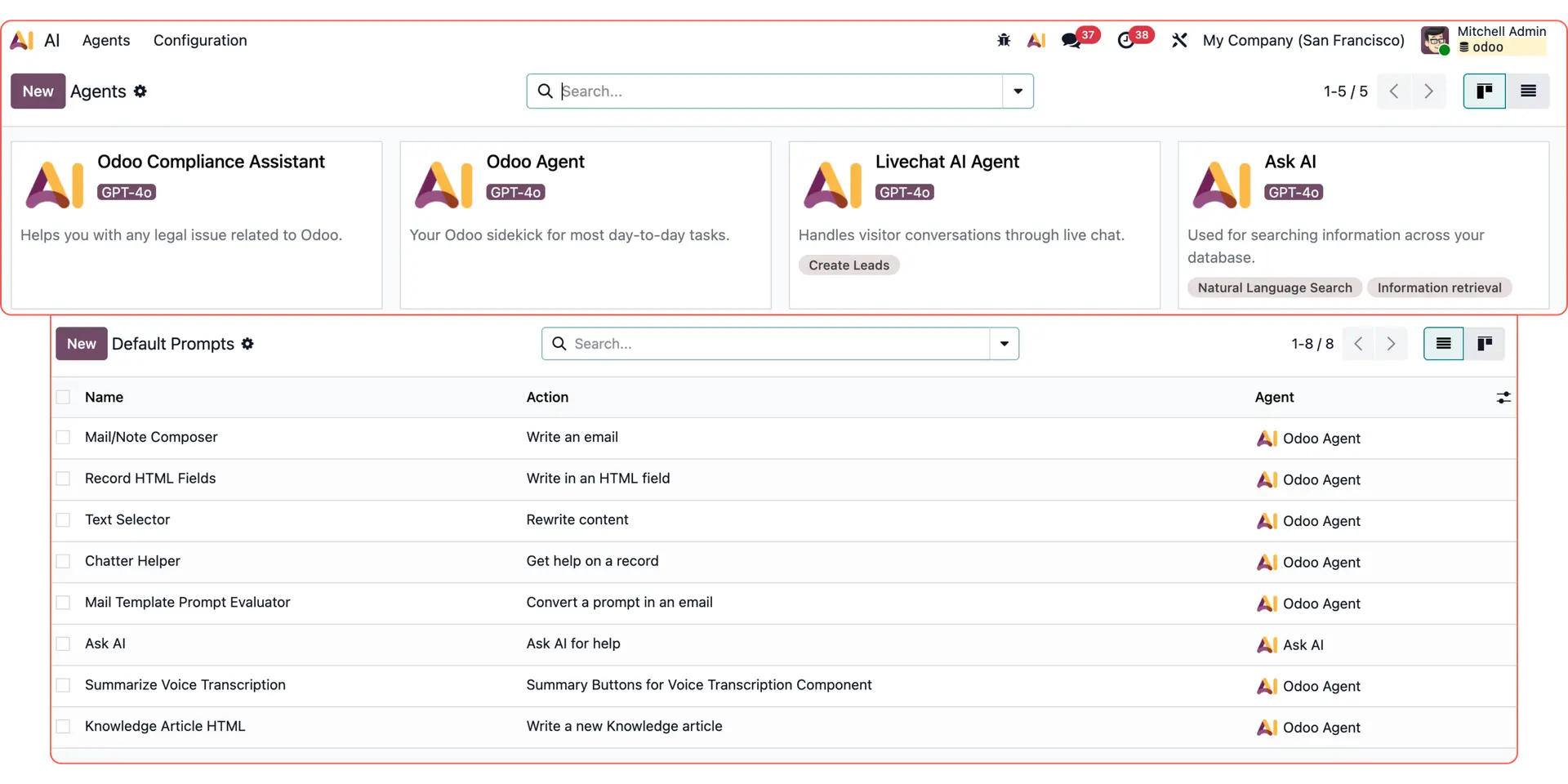
For more Odoo AI use cases, check out:
Custom email replies with Odoo AI dynamic text
Reporting & data analysis with Odoo AI Agents
Follow-up emails with Odoo AI Agents
Responding to live chat leads with Odoo AI Agents
How to generate follow-up emails with Odoo AI
Here is how the Odoo AI Agent transforms a simple instruction into a comprehensive, ready-to-send draft.
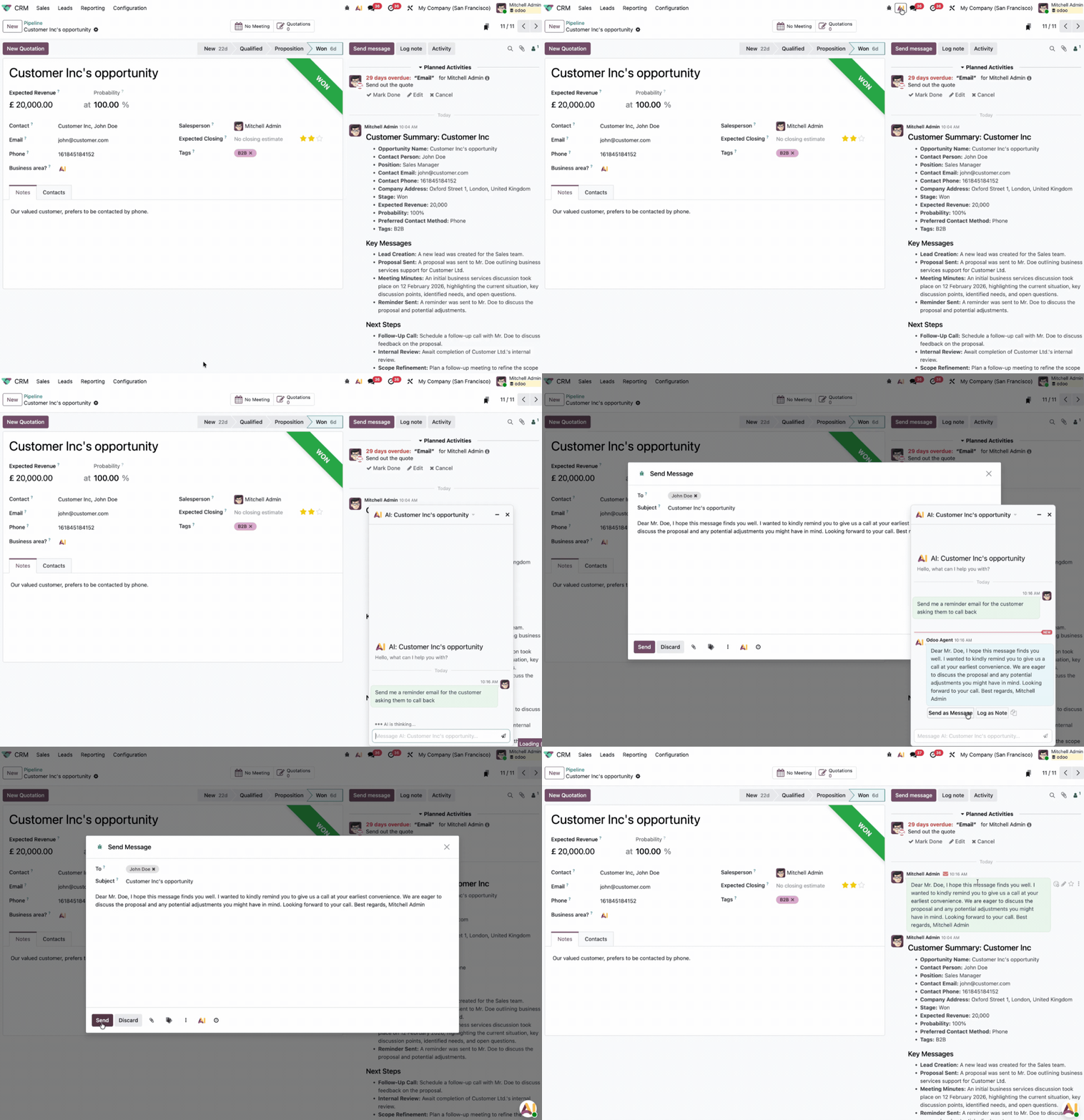
Give the AI Agent a simple task
Open the Odoo AI chatbot by clicking the icon at the top of your screen.
Write down what you need as if you were talking to a colleague. For example:
“Send a reminder email to the customer asking them to call back.”
Odoo AI collects all the data from your records
Odoo AI analyses the context of the data record you are currently in and immediately understands the initial situation.
In this case, the AI Agent recognises that our customer prefers to be contacted by phone and is currently to
Adjust & send the email
Odoo will generate a context-aware draft that automatically includes the customer’s name and preferences inside the chatbot window.
Click on “Send as Message”, and the normal Odoo email pop-up window will appear, with all the contact information and AI-generated email.
Once you check the draft and adjust it if needed, simply hit send.
Automate your admin tasks with Odoo AI
If you have any questions on how this setup works or want to discover specific Odoo AI use cases for your business, our team of experts can help.