When support teams receive a ticket, they either resolve the issue quickly and efficiently or risk losing a customer.
Yet, in a live helpdesk interaction, critical details can slip through the cracks, and teams are slowed down without any overview.
Even with a dedicated ticketing system, communication is often handled separately from the operational tools required to solve the issue.
This means that support teams are left searching for customer data and context across different tools while the customer waits.
See how Odoo Helpdesk centralises multi-channel requests for support and links customer communication directly to operations for quick ticket resolution.
Table of contents
Odoo Helpdesk fills in gaps for support teams
Odoo Helpdesk workflow
Odoo Helpdesk use cases
Odoo Helpdesk fills in the information gaps for support teams
Odoo Helpdesk was built to eliminate information black holes when dealing with customer requests.
It aggregates all information related to the customer and their history into a single source of truth.
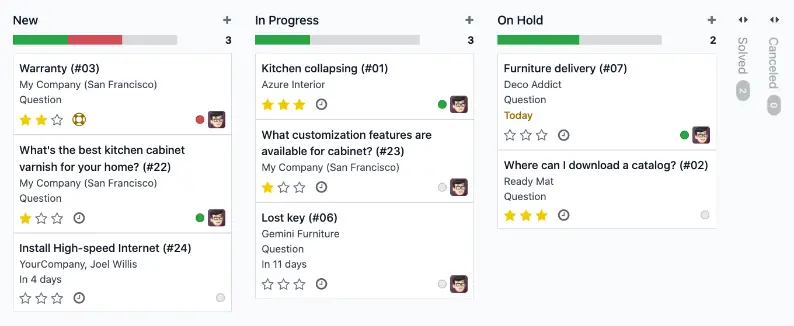
Odoo Helpdesk centralises all your customer tickets and information in one view.
Odoo solves common problems of support teams:
- Scattered communication: Every message is moved into a shared Chatter, so the whole team sees the history
- No follow-up on tickets: The system tracks exactly how long a customer has been waiting and flags the ticket if it sits too long
- Duplicate context: Tickets link directly to Sales Orders and Inventory, so agents don't have to ask customers for info you already have
- Lack of ownership: The system assigns every ticket to a specific person the moment it arrives, based on their availability.
Odoo Helpdesk connects your end-to-end support workflow
Odoo’s integrated environment ensures that each customer request is processed to a full resolution without losing sight of the ticket.
Capture every request with multi-channel ticket acquisition
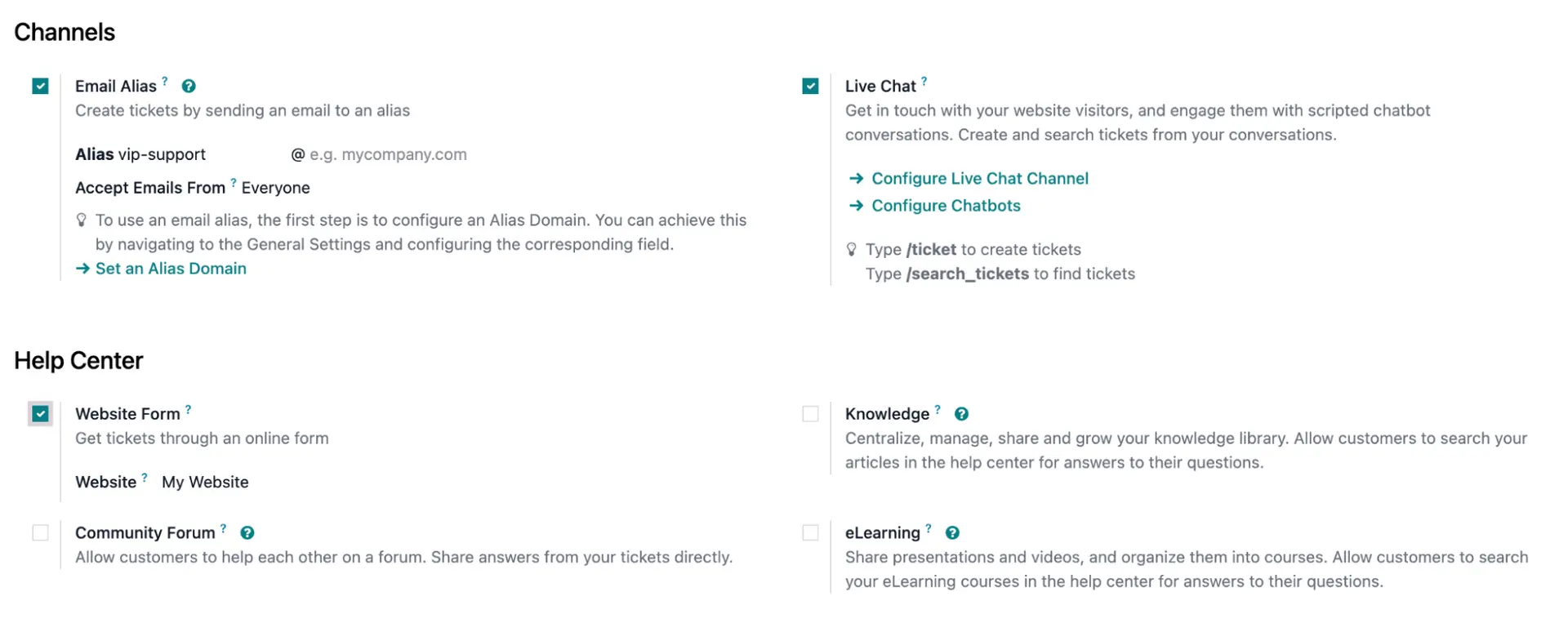
Odoo directs all customer requests into one structured pipeline. You can choose exactly how customers reach you, including via:
- Email: Incoming mail to your support address becomes a ticket automatically, and any attachments are also added to the ticket
- Web forms: Customers fill out a form on your site. Their data is added directly into the ticket fields, like a serial number
- Live chat: Chatbots or AI-powered live chat agents answer basic questions. If they can’t help, they pass the conversation to a human agent or generate a ticket based on the given information.
Assign the work with automated triage and assignment logic
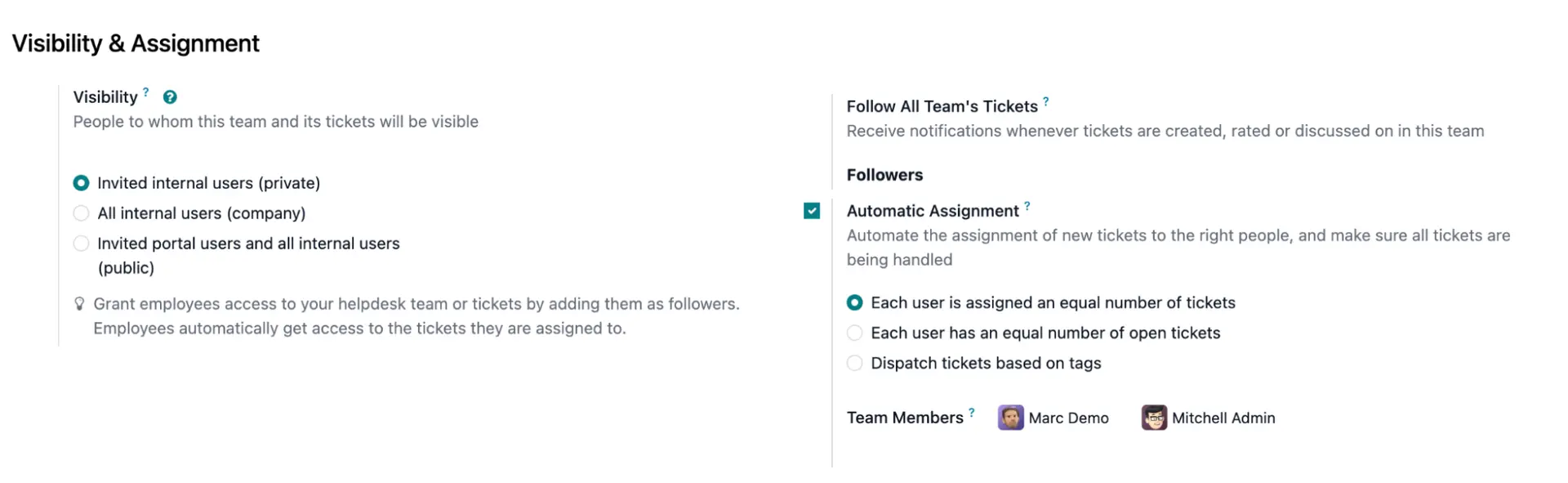
With Helpdesk, teams don’t have to wait for a manager to allocate their tickets. Odoo assigns them based on availability and pre-established logic:
- Manual: This refers to the Kanban view of the Helpdesk app. A manager or team lead looks at the "New" column and physically drags the ticket card into the column or user filter of a specific agent
- Random: The system uses a round-robin style logic. As tickets hit the "New" stage, Odoo cycles through the list of active team members (those not on leave or ignored in settings) and hands them out one by one
- Balanced: This is the most intelligent version. Odoo runs a count of open tickets currently assigned to every member of the Helpdesk team. It then pushes the newest ticket to the person with the lowest number, ensuring no single agent is overwhelmed while others are idle.
In Odoo 19, you find these options by navigating to Helpdesk > Configuration > Helpdesk Teams and looking under the Assignment section of the team’s settings page.
Solve the Helpdesk ticket with other integrated Odoo apps
Helpdesk is connected to your entire Odoo system. Agents can use Smart Buttons to trigger business moves in Inventory, Purchase, Accounting, and more directly from the ticket.
Odoo Helpdesk connects to other apps so agents can process an entire ticket from one view:
Click-to-call
Agents initiate calls to clients directly from the phone icon on the ticket with Odoo VoIP.
Automatic logging
Once a call ends, Odoo prompts the agent to log a note. Call recording links can be appended to the Chatter for quality assurance.
Returns (RMA)
Agents click "Return" to validate the original Sales Order and create a Reverse Transfer in the Warehouse.
Repairs
A "Repair" button generates a Repair Order tracking the fix through stages like "Under Diagnosis" and "Parts Ordered”.
Refunds
For billing disputes, agents can create a draft Credit Note in the Accounting module for final validation.
Enforce standards with timers and automations
Odoo Helpdesk handles the administrative work so agents can focus on the customer.
Timers (SLAs)
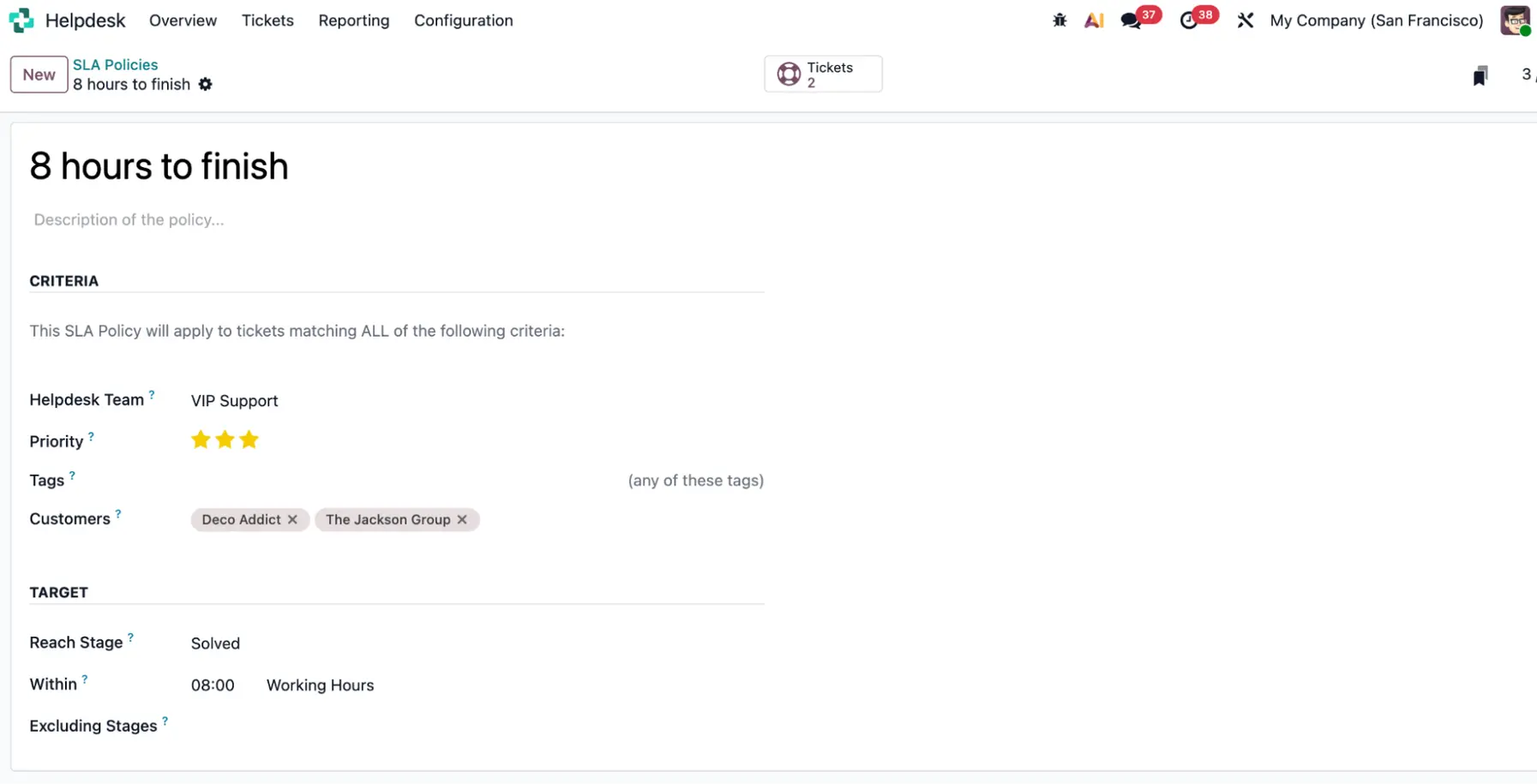
You set a deadline for a response. If the ticket isn't touched by then, it turns red on the dashboard to warn a manager. You can define rules in Helpdesk > Configuration > SLA Policies to set response-time targets by priority.
Follow-ups
If a customer stops replying, Odoo sends a "still there?" email and closes the ticket after 7 days.
Closing a ticket
Use Automation Rules to set a trigger that sends a Satisfaction Survey automatically when a ticket is moved to the "Solved" stage.
Unified customer information
If a customer sends three emails about one problem, you can merge them into a single thread.
Odoo Helpdesk works for various business cases
Some teams need to manage high-volume shipping errors and financial disputes over returns. Others deal with complex technical debugging or fixing products in warranty.
Odoo Helpdesk can flexibly manage various support needs in one app.
Technical tiered support
In environments with multiple support tiers, Odoo uses the Sub-ticket feature. Tier 1 handles initial triage and assigns technical tasks to specialists or developers without losing the primary customer record. Private Notes enable internal technical collaboration away from the customer's view.
eCommerce logistics
For high-volume shipping operations, Odoo links tickets directly to Inventory and shipping carriers. If a customer reports a damaged item via a website form, the agent can track the package and trigger a replacement directly from the ticket.
Billing and accounts
Financial teams can manage disputes by creating tickets manually from the Invoicing module. They can use the Refund smart button so financial records stay accurate and linked to the original dispute thread.
Let’s discuss your Odoo Helpdesk setup
Our experts help you keep your ticket pipeline clear by linking your support communication directly to your operational execution.