Odoo incluye funciones integradas que cubren los procesos de cumplimiento normativo más importantes: trazabilidad, rastros de auditoría, controles de calidad, privacidad de datos y más.
Como todas estas funciones están dentro de los flujos de trabajo que tu equipo ya utiliza, a menudo pasan desapercibidas. Pero, una vez configuradas correctamente, todas tus necesidades normativas se gestionan automáticamente en segundo plano.
Descubre cómo Odoo puede mantener tu empresa en regla desde el primer momento en algunos de los sectores más regulados.
Odoo está diseñado para ser transparente y auditable en todas las aplicaciones
Odoo tiene dos funciones principales que garantizan la transparencia en toda la empresa y en cada aplicación.
Rastros de auditoría a nivel de campo y actualizaciones en el chatter
Los auditores necesitan saber quién cambió qué, cuándo y por qué.
Odoo registra los cambios hasta el nivel de cada campo en aplicaciones como Inventario, Compra, Quality y Contabilidad.
Un empleado edita un campo, como una especificación de producto, un dato bancario o un estado de calidad
El chatter de Odoo registra el autor, la fecha y hora exactas y los valores anteriores y nuevos
Odoo archiva los registros en lugar de eliminarlos para mantener intacto tu historial operativo
Durante la conciliación bancaria, Odoo marca como posibles duplicados las transacciones con importes y fechas coincidentes (según su propia lógica de detección y la del proveedor de datos bancarios), de modo que los asientos duplicados se detectan antes de llegar a la aprobación
La IA integrada condensa los extensos registros del chatter y todo el contexto en un resumen rápido para revisiones ágiles.
Gestión documental controlada y control de versiones
Trabajar con documentos de procesos obsoletos genera riesgos de cumplimiento innecesarios.
Las aplicaciones Documentos de Odoo y Firma electrónica de Odoo te ofrecen un lugar central para los archivos críticos:
Cuando subes una nueva versión de un archivo, Odoo archiva automáticamente la anterior
Cuando llegan documentos, la clasificación de documentos con IA de Odoo lee cada archivo y lo envía automáticamente a la carpeta correcta según una instrucción que tú defines
Cuando cambia un documento de proceso, la aplicación Firma electrónica de Odoo envía solicitudes de firma al personal correspondiente y registra la firma, la fecha y hora y la dirección IP directamente en su perfil de empleado
Los recordatorios automáticos de renovación se activan según las fechas de caducidad de certificados o licencias, antes de que se pase nada por alto.
Casos de uso de cumplimiento en Odoo para sectores de nicho regulados
Como ERP open source totalmente integrado, Odoo es ideal para empresas de sectores de nicho con requisitos estrictos. Su capacidad de configuración lo hace muy adecuado para el MedTech, fabricación regulada, alimentación y bebidas y contratación pública.
Farmacia y MedTech: trazabilidad de lotes y números de serie de extremo a extremo
Gestionar retiradas de lotes requiere una visibilidad clara desde la recepción de los componentes hasta la entrega final. Normativas como el MDR de la UE y normas como ISO, junto con organismos como la FDA y la EMA, exigen trazabilidad documentada de los lotes en cada paso de producción. Además, normalmente se espera que el alcance de la retirada se determine en un plazo de 24 horas desde el aviso.
Seguimiento de materiales en Odoo, del proveedor al cliente
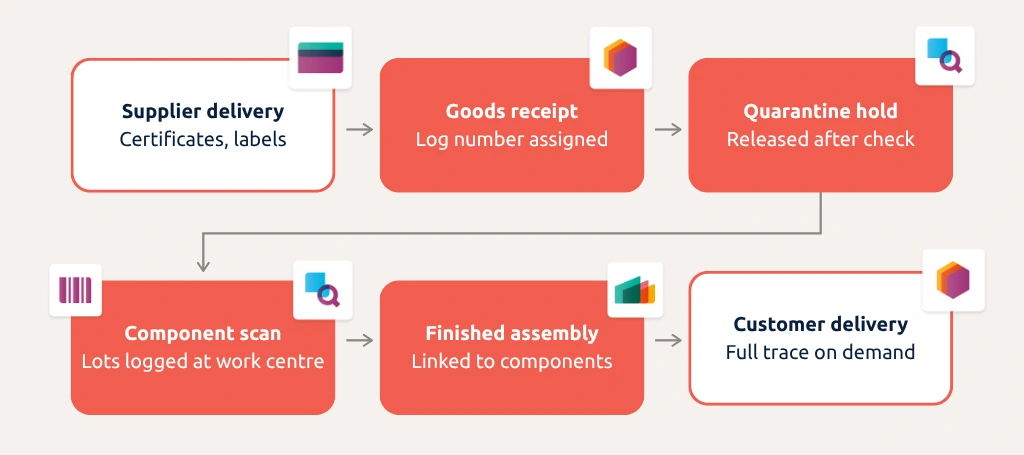
Odoo impone el escaneo obligatorio de códigos de barras de materias primas y productos terminados en los pasos de recepción, transferencia y fabricación.
Los operarios escanean o introducen los números de lote y las fechas de caducidad directamente en la recepción de mercancías. Odoo vincula automáticamente componentes y productos y genera informes de trazabilidad completos bajo demanda.
Automoción y aeroespacial: órdenes de cambio de ingeniería (ECO) controladas
Las normas internacionales de calidad para la producción de automoción y aeroespacial exigen una autoridad de aprobación documentada para cada cambio. Si una modificación no aprobada llega a la línea de montaje, provoca de inmediato un incumplimiento normativo.
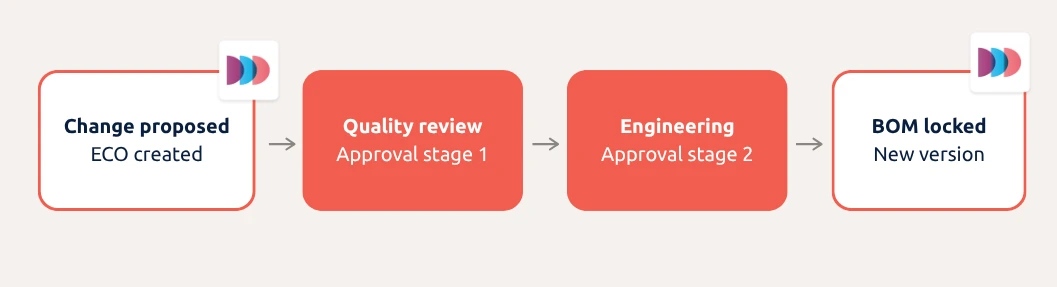
Odoo PLM gestiona los cambios de ingeniería mediante listas de materiales versionadas que quedan bloqueadas hasta que una ECO se aprueba por completo.
Los cambios de diseño pasan por etapas de aprobación configurables antes de llegar a producción. Al configurar plantillas de aprobación que separan a los autores de las ECO de los aprobadores, las empresas pueden aplicar la segregación de funciones en todo su equipo de ingeniería.
Proceso de aprobación de ECO
Alimentación y fabricación conforme a ISO: controles de calidad automatizados y cuarentena
Saltarse controles de calidad o liberar stock no verificado expone directamente los productos a riesgos de contaminación o no conformidad. Las normas de seguridad alimentaria y de calidad en fabricación exigen pruebas documentadas de control en cada fase de producción, con una acción correctiva trazable para cada control fallido.
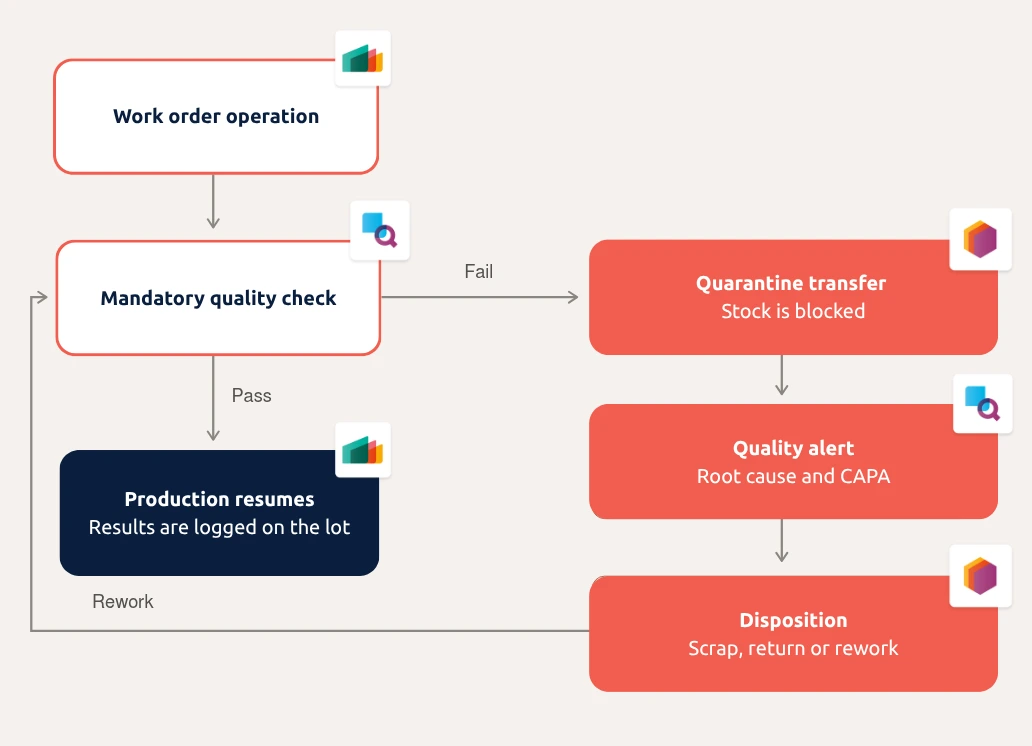
La aplicación Quality de Odoo activa puntos de control de calidad (QCP) automatizados cuando llegan mercancías, se mueven entre ubicaciones o completan un paso de fabricación. Las órdenes de trabajo se detienen hasta que se superan los controles obligatorios.
Si un control falla, Odoo transfiere automáticamente el stock afectado a una ubicación de cuarentena. El responsable de calidad recibe una notificación y documenta manualmente las acciones correctivas y preventivas (CAPA) directamente en la alerta de calidad.
Proceso de control de calidad y cuarentena
Aprovisionamiento: control del gasto y conciliación a 3 vías
Una sola discrepancia en una factura puede generar problemas de cumplimiento financiero. Las normas de aprovisionamiento y auditoría interna exigen cadenas de aprobación estrictamente documentadas y la verificación de facturas para evitar pagos no autorizados y procesamientos duplicados.
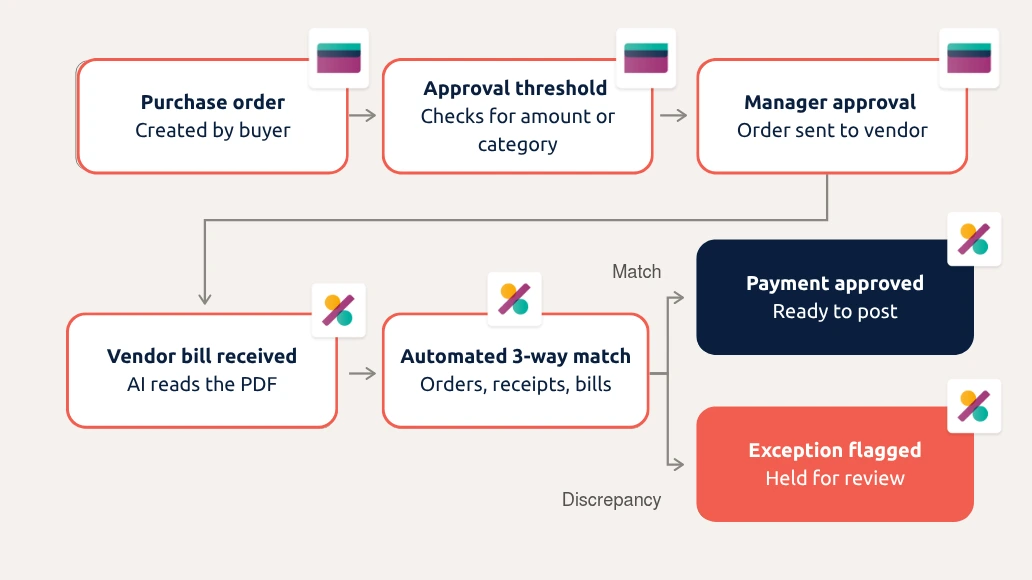
La aplicación Compra de Odoo te permite definir reglas de aprobación según el importe de compra, la categoría del proveedor o los límites presupuestarios. Con la configuración de los derechos de acceso, impide que los compradores aprueben sus propios pedidos.
Además, ejecuta comprobaciones automáticas en segundo plano para detectar registros de proveedores duplicados antes de que causen problemas de pago o de auditoría.
Cuando llega una factura de proveedor, la digitalización de documentos de Odoo lee automáticamente el PDF y realiza la conciliación a 3 vías. Así se detecta cualquier discrepancia en cantidades, precios o líneas respecto al pedido de compra original y a la recepción de stock antes de aprobar el pago.
Proceso de aprobación de compras
La IA agéntica lleva tu flujo de cumplimiento en Odoo un paso más allá
Odoo 20 introdujo un agente de IA para auditoría contable que recorre de forma autónoma las listas de comprobación financieras, revisando conciliaciones y señalando anomalías en lenguaje sencillo.
Pero, además de las funciones de IA actuales de Odoo (y si no quieres actualizar a la v20 de inmediato), también puedes conectar un asistente de IA externo a tu sistema mediante MCP (Protocolo de Contexto de Modelo). Se trata de un estándar abierto que permite a los asistentes de IA leer y trabajar de forma segura en sistemas empresariales.
El much. Odoo MCP Server permite que asistentes de IA como Claude, ChatGPT o Copilot accedan a tus datos de Odoo a tiempo real, para que puedas hacer preguntas sobre distintas aplicaciones en lenguaje sencillo:
«¿Qué lotes de proveedor se utilizaron en el lote B-2023-114 y qué clientes lo recibieron?»
«Abre una alerta de calidad en el lote LOT-2023-114 por el defecto de embalaje que ha notificado el inspector y asígnala al responsable de calidad»
«Fija la fecha de caducidad de los lotes de la entrega de Meyer de ayer en el 12 de marzo de 2027, tal como figura en su certificado»
«Elimina las facturas de proveedor en borrador que se han importado dos veces esta mañana».
El asistente solo ve lo que el usuario puede ver en Odoo, puede limitarse a acceso de solo lectura y cada solicitud a la IA queda registrada. También puedes exigir que una persona confirme antes de modificar cualquier registro.
Preguntas frecuentes sobre cumplimiento en Odoo
¿Registra Odoo los cambios de los usuarios en todas las aplicaciones?
Sí. Los cambios en los campos con seguimiento se registran en el chatter del registro con el autor, la fecha y hora y los valores anteriores y nuevos, y el comportamiento es el mismo en Inventario, Compra, Quality o Contabilidad. Los registros se archivan en lugar de eliminarse, así que el historial sigue disponible para los auditores, y la IA de Odoo puede resumir un chatter largo en una breve visión general.
¿Puedo configurar controles de calidad en Odoo y documentarlos por completo?
Sí. Los puntos de control de calidad generan controles automáticamente en la recepción, durante la fabricación o antes de la entrega. Cada resultado se guarda vinculado al lote, la operación y el operario. Cuando un control falla, se abre una alerta de calidad en la que el responsable de calidad documenta la causa raíz y las acciones correctivas y preventivas (CAPA) directamente en el registro.
¿Puedo asignar distintos niveles de acceso en Odoo a nivel de aplicación, acción y registro?
Sí. Los derechos de acceso controlan qué aplicaciones puede abrir un usuario y si puede leer, crear, editar o eliminar en ellas. Las reglas de registro lo limitan a registros concretos, como solo su propio departamento o empresa, y los grupos a nivel de campo ocultan los campos sensibles a los usuarios que no deben verlos.
Hablemos de cómo configurar tu flujo de cumplimiento en Odoo
Nuestros expertos pueden ayudarte a automatizar tus procesos de cumplimiento en Odoo o a crear flujos de trabajo asistidos por IA adaptados a tu negocio.