Die Kategorisierung von Datensätzen in Odoo erforderte bisher entweder mühsame manuelle Eingaben oder starre „Wenn-Dann“-Programmierung.
Manuelle Arbeit ist jedoch fehleranfällig, und individueller Code setzt technisches Expertenwissen voraus – beides ist schwer zu pflegen, wenn das System wächst.
Mit den neuen KI-Feldern in Odoo Studio können Sie komplexe Geschäftslogik in natürlicher Sprache definieren.
Wir zeigen Ihnen, wie Sie Ihre Datenklassifizierung mit KI automatisieren, ohne eine einzige Zeile Code zu schreiben.
Odoo KI wird zum No-Code-Entwickler
KI in Odoo Studio ermöglicht es Ihnen, intelligente Felder aufzubauen, die Regeln flexibel interpretieren.
Im Gegensatz zu einer starren Formel kann ein KI-Feld unstrukturierte Daten verarbeiten und sich in Sekundenschnelle an neue Vorgaben anpassen.
Das ermöglicht Ihnen:
- No-Code-Lösungen zu implementieren: Sie bauen komplexe Logiken auf, für die früher ein Entwickler nötig gewesen wäre.
- Anforderungen flexibel anzupassen: Wenn sich Ihr Geschäftsbereich erweitert, aktualisieren Sie einfach Ihren Prompt, statt den Code neu zu schreiben.
- Daten sauber zu halten: Sie gewährleisten eine konsistente Klassifizierung über tausende Datensätze hinweg – ganz automatisch.
- Mehrdeutige Daten zu verstehen: Die KI kann unklare Informationen interpretieren, an denen Standardfilter normalerweise scheitern.
Odoo 19 führt autonome KI-Agenten ein
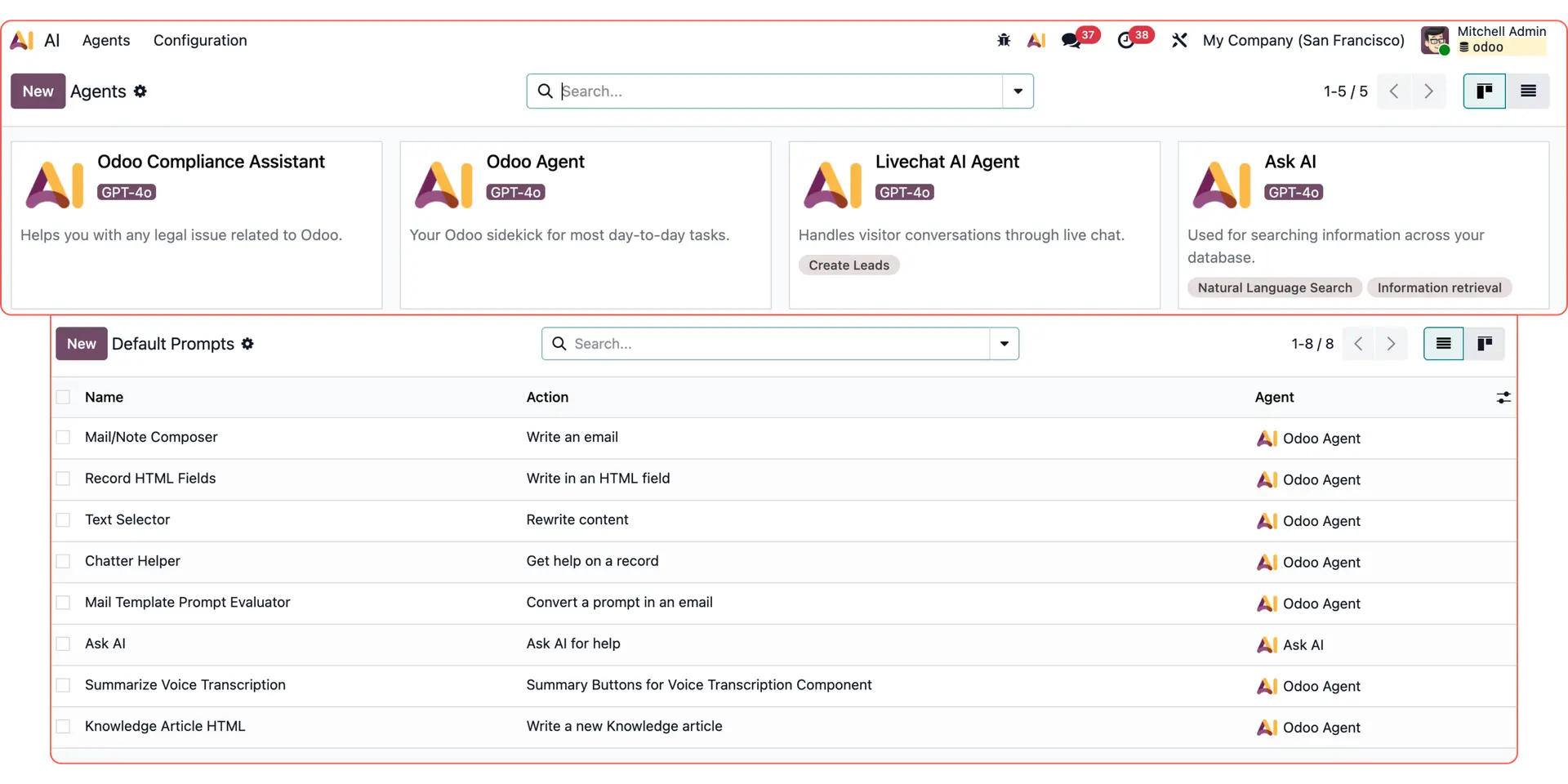
Mit der Version 19 hat Odoo den Weg für eine autonomere KI geebnet und bietet integrierte Agenten wie Ask AI, den Odoo Agent, den Compliance Assistant sowie den Livechat Agent an. Darüber hinaus können Nutzer nun ihre eigenen agentenbasierten KI-Workflows erstellen.
Entdecken Sie weitere Odoo KI-Anwendungsfälle:
Individuelle E-Mail-Antworten: Erstellen Sie dynamische Texte mit Odoo KI.
Reporting & Datenanalyse: Nutzen Sie Odoo KI-Agenten für Auswertungen.
Follow-up-E-Mails: Automatisieren Sie das Nachfassen per KI.
Livechat-Leads: Antworten Sie Interessenten sofort per KI-Agent.
Odoo AI Studio: Nutzen Sie intelligente Felder direkt in Studio.
Datenzusammenfassung: Lassen Sie Datensätze kompakt aufbereiten.
Wissensmanagement: Klären Sie Fragen anhand interner Dokumente.
So erstellen Sie intelligente KI-Felder in Odoo Studio
KI-Felder in Studio eignen sich hervorragend, um komplexe Filter zu automatisieren, die granulare Daten über alle Datensätze hinweg erfordern.
Sehen wir uns am Beispiel an, wie ein KI-Feld automatisch bestimmt, ob ein Kunde innerhalb eines bestimmten Einzugsgebiets liegt.
1. Das Feld in Odoo Studio anlegen
Navigieren Sie zum Datensatz, den Sie bearbeiten möchten (z. B. CRM → Pipeline → Auswahl einer Verkaufschance).
Aktivieren Sie den Debug-Modus und öffnen Sie Studio über das Werkzeug-Icon am oberen Bildschirmrand.

Sobald Studio geöffnet ist, ziehen Sie ein neues KI-Feld in Ihre Ansicht.
In unserem Beispiel erstellen wir ein Auswahlfeld namens „Geschäftsbereich?“, das uns sagt, ob der Kontakt:
- In unserem Kerngebiet (Großraum London) liegt.
- Außerhalb des Kerngebiets, aber innerhalb Großbritanniens liegt.
- Außerhalb Großbritanniens liegt.
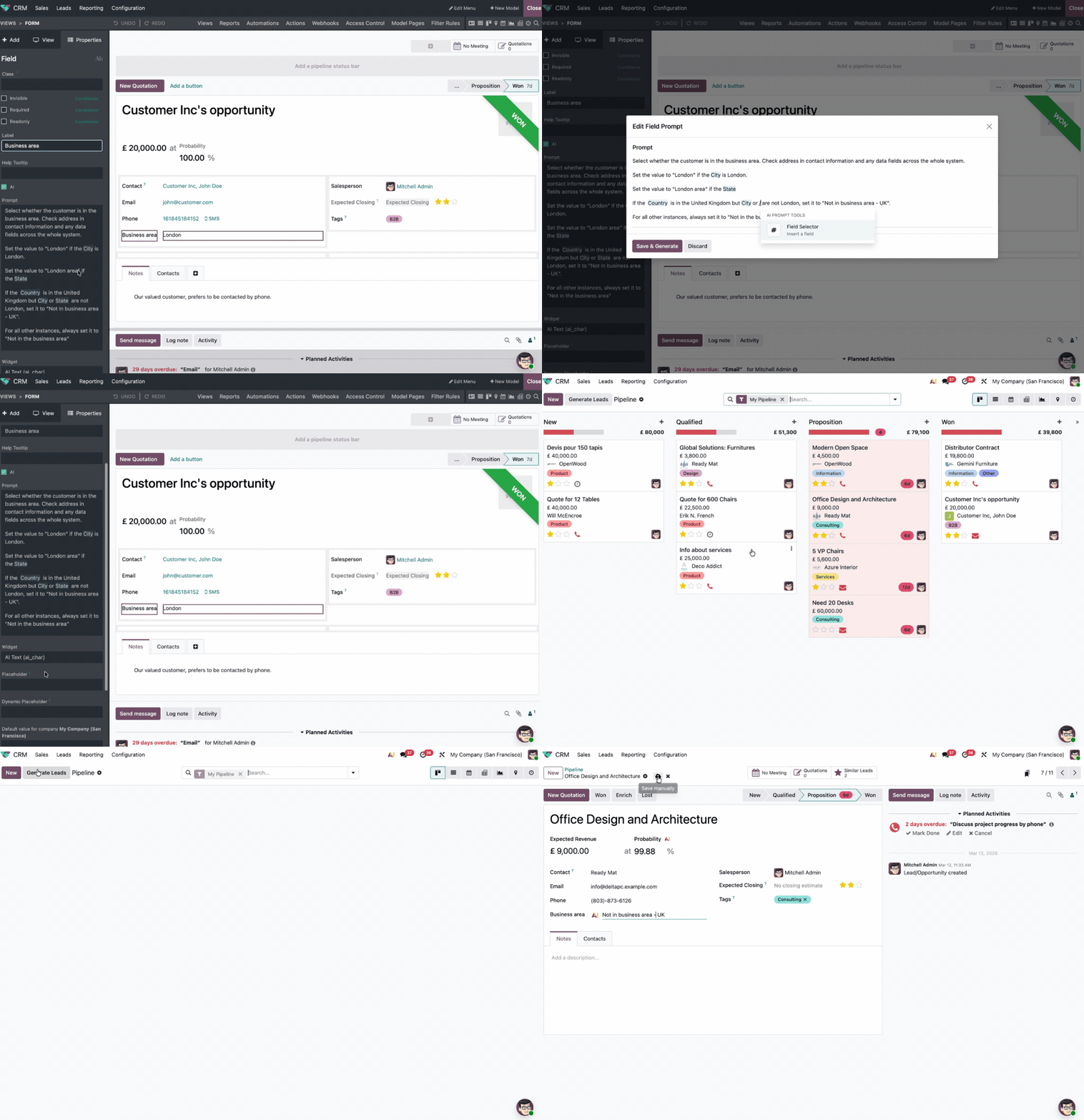
2. Der KI die Logik in Alltagssprache erklären
Statt ein Skript zu schreiben, beschreiben Sie Ihre Regeln einfach im Prompt-Feld. Wir haben der KI folgende Anweisung gegeben:
„Wähle aus, ob der Kunde im Geschäftsbereich liegt. Prüfe dazu die Adresse in den Kontaktinformationen und alle Datenfelder im gesamten System.
Setze den Wert auf 'London', wenn die Stadt London ist.
Setze den Wert auf 'London Area', wenn es sich um den Bundesstaat/Kanton handelt.
Wenn das Land das Vereinigte Königreich ist, aber Stadt oder Staat nicht London sind, setze 'Nicht im Geschäftsbereich - UK'.
In allen anderen Fällen setze
'Nicht im Geschäftsbereich'.“
3. Die Automatisierung auslösen
Die KI kann dieses Feld nun auf zwei Arten füllen:
- Manuell: Klicken Sie auf das KI-Icon neben dem Feld, um eine sofortige Analyse des Datensatzes zu starten.
- Automatisch: Hinterlegen Sie die Logik als „Automatisierte Aktion“. Die KI klassifiziert den Datensatz dann sofort beim Erstellen, Importieren oder Aktualisieren.
Bonus-Tipp: Sie können die KI-Logik auch an spezifische Ereignisse koppeln. So kann die Odoo KI einen Lead beispielsweise genau in dem Moment neu klassifizieren, in dem sich sein Status von „Qualifiziert“ auf „Gewonnen“ ändert, damit Ihre Berichte immer präzise bleiben.
Odoo KI-Studio-Felder vs. Standard-Anpassungen
Funktion | Standard-Anpassung | Odoo KI-Studio-Felder |
Logik | Liefert identische Ergebnisse bei festen Eingaben. | Interpretiert Kontext und unstrukturierte Daten. |
Einrichtung | Erfordert Entwicklerwissen (Python/XML). | Definiert durch Prompts in natürlicher Sprache. |
Wartung | Jeder Sonderfall muss manuell codiert werden. | Bewältigt Mehrdeutigkeiten durch einfache Prompt-Änderung. |
Idealer Einsatz | Finanzdaten und 100% mathematische Genauigkeit. | Regionen, Stimmungen (Sentiment) oder Prioritäten. |
Datenlogik mit Odoo KI automatisieren
Wenn Sie manuelle Dateneingaben vermeiden und auf intelligente Automatisierung setzen möchten, unterstützt Sie unser Team gerne bei der Konfiguration Ihrer Odoo KI-Workflows.