Einen Kundensupport rund um die Uhr anzubieten, ist für viele Unternehmen ein logistischer Albtraum – vor allem, wenn keine Mitarbeiter im Schichtbetrieb verfügbar sind.
Klassische Chatbots sind oft zu starr und frustrieren Kunden mit vordefinierten Antworten, die selten auf spezifische Anliegen eingehen.
Mit Odoo KI wird Ihr Live-Chat zu einem intelligenten Vertriebsassistenten. Wir zeigen Ihnen, wie Sie einen einfachen Website-Besuch mithilfe eines KI-Agenten in einen qualifizierten Lead verwandeln.
Odoo KI als Ihr 24/7-Vertriebsassistent
Wenn ein Website-Besucher zu lange auf eine Rückmeldung warten muss oder nur unzureichende Antworten erhält, verlässt er die Seite meist schnell wieder.
Hier springt Odoo KI ein, wenn gerade kein menschlicher Mitarbeiter verfügbar ist. Statt roboterhafter Standardphrasen nutzt sie den Kontext Ihrer Website und Ihr internes Wissen, um relevante Informationen zu liefern.
Sollte das nicht ausreichen, kann Ihr KI-Agent Kontaktdaten abfragen, alternative Ansprechpartner nennen oder den Kunden direkt mit einem Teammitglied verbinden.
Die Vorteile im Überblick:
- Support sofort skalieren: Bearbeiten Sie hunderte Anfragen gleichzeitig, ohne Ihr Team zu überlasten. Mitarbeiter schalten sich nur bei Bedarf ein.
- Kundenerfahrung verbessern: Besucher erhalten Antworten auf technische Fragen oder Preisdetails in Echtzeit, was die Verweildauer auf der Seite erhöht.
- Leads automatisch erfassen: Die KI sammelt Anforderungen und Daten, noch bevor ein Mensch den Chat betritt, und speichert diese direkt im CRM.
Odoo 19 führt autonome KI-Agenten ein
Mit der Version 19 hat Odoo den Weg für eine autonomere KI geebnet und bietet integrierte Agenten wie Ask AI, den Odoo Agent, den Compliance Assistant sowie den Livechat Agent an. Darüber hinaus können Nutzer nun ihre eigenen agentenbasierten KI-Workflows erstellen.
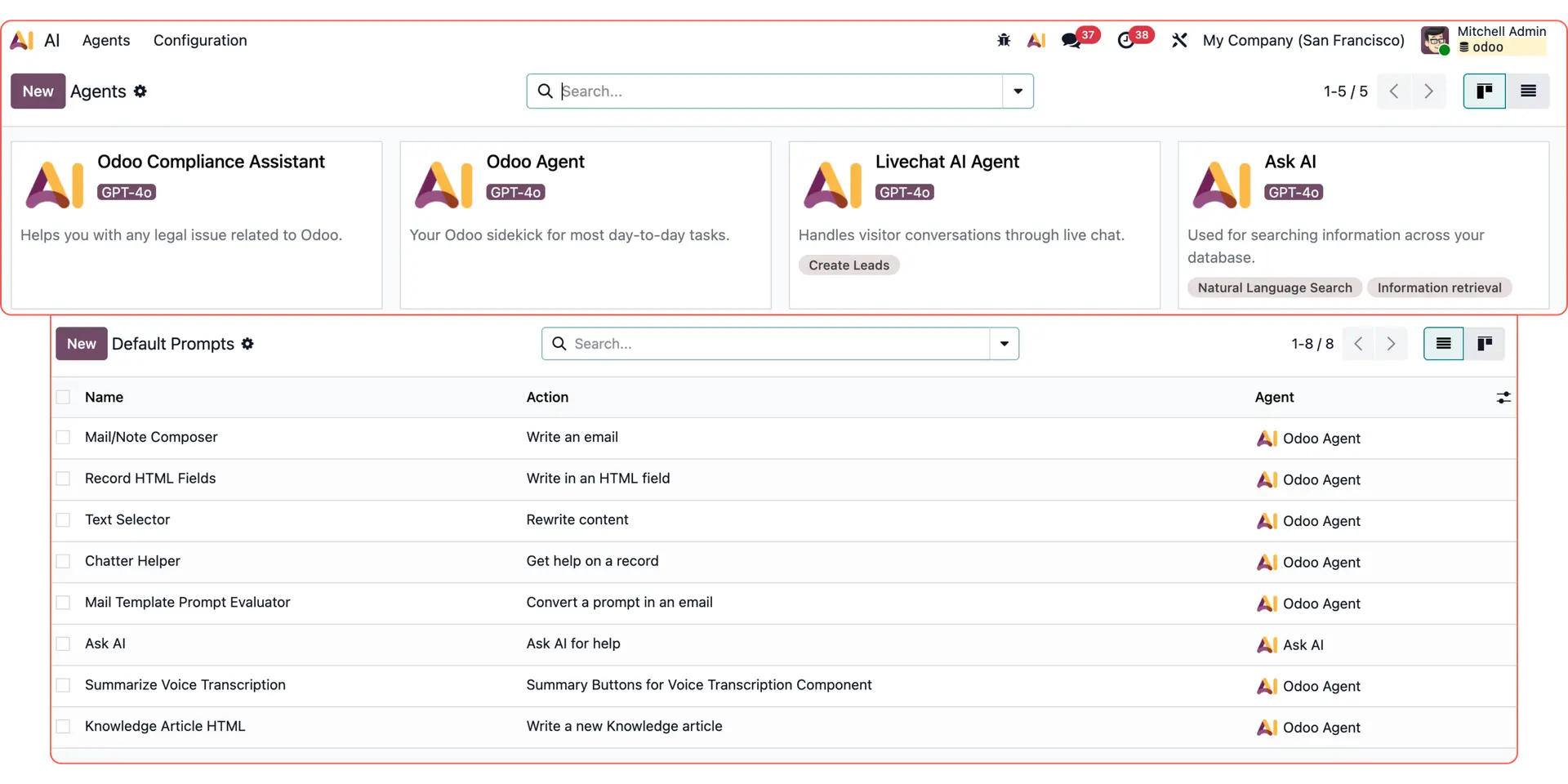
Entdecken Sie weitere Odoo KI-Anwendungsfälle:
Individuelle E-Mail-Antworten: Erstellen Sie dynamische Texte mit Odoo KI.
Reporting & Datenanalyse: Nutzen Sie Odoo KI-Agenten für Auswertungen.
Follow-up-E-Mails: Automatisieren Sie das Nachfassen per KI.
Livechat-Leads: Antworten Sie Interessenten sofort per KI-Agent.
Odoo AI Studio: Nutzen Sie intelligente Felder direkt in Studio.
Datenzusammenfassung: Lassen Sie Datensätze kompakt aufbereiten.
Wissensmanagement: Klären Sie Fragen anhand interner Dokumente.
So automatisieren Sie Ihren Website-Live-Chat mit Odoo KI
Sehen wir uns an, wie ein Odoo KI-Agent eine komplexe Kundenanfrage direkt auf Ihrer Website bearbeitet.
Besucher können das Live-Chat-Widget auf Ihrer Startseite oder einer speziellen Landingpage öffnen.
Nehmen wir als Beispiel einen Interessenten auf einer Website für Tiny Houses. Dieser stellt mehrere Fragen auf einmal:
„Lohnt sich ein Tiny House für eine Person? Welche Modelle gibt es, wie langlebig sind sie und wo kann ich ein Angebot anfordern?“
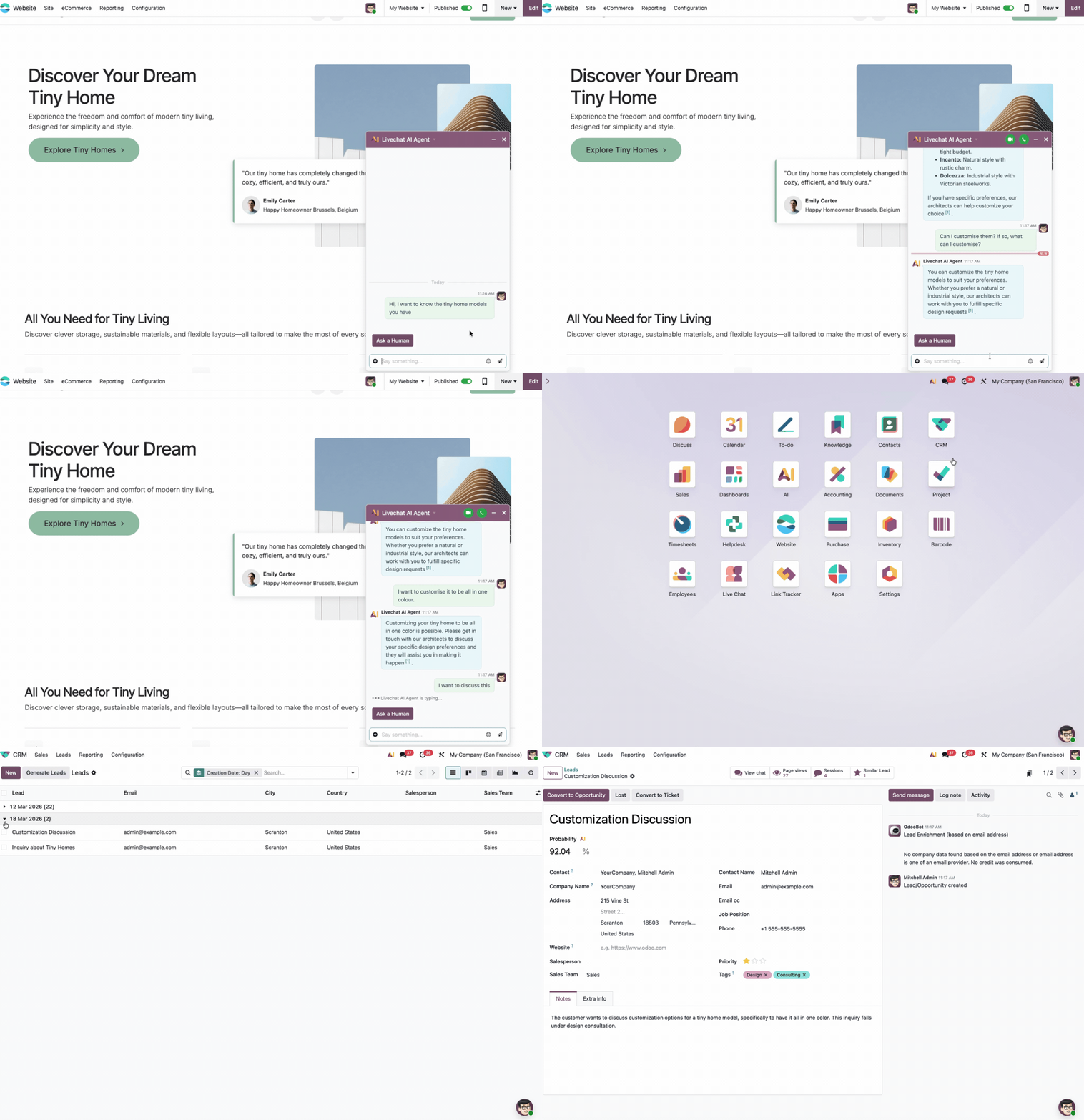
Basierend auf den Informationen, die Sie im Backend hinterlegt haben, reagiert die KI automatisch:
- Wissensdatenbank konsultieren: Sie erklärt die Vorteile des Wohnens auf kleinem Raum und geht auf Ihre spezifischen Qualitätsstandards ein.
- Produktoptionen teilen: Sie listet die verfügbaren Modelle basierend auf Ihrem aktuellen Katalog oder Inventar auf.
- Conversion steuern: Sie leitet den Kunden an, wie und wo er ein konkretes Angebot anfordern kann.
Falls der Kunde dennoch persönliche Hilfe benötigt, kann er per Klick einen menschlichen Mitarbeiter anfordern.
Die KI bleibt dabei im Hintergrund und liefert dem Teammitglied eine vollständige Zusammenfassung des bisherigen Gesprächsverlaufs, damit dieses sofort im Bilde ist.
Nach dem Chat wird der Interessent sofort in Ihrem CRM erfasst. Sie finden den Kontakt unter CRM → Leads.
Dort können Sie nach dem Erstellungsdatum filtern und den neuen, vom KI-Agenten erstellten Lead einsehen – inklusive passendem Titel, Kontext und den hinterlegten Kontaktinformationen.
Optimieren Sie Ihre Kundenerfahrung mit Odoo KI
Möchten Sie erfahren, wie ein Odoo KI-Agent für Ihren spezifischen Anwendungsfall konfiguriert werden kann? Unsere Experten unterstützen Sie dabei, Ihre Prozesse zu digitalisieren.